
Odoo Surveys
Ask questions, put the answers to work
With Odoo Surveys you create questionnaires, collect answers online or live in the room and analyze them right away. So feedback shapes decisions instead of getting lost in the inbox.
What's inside Odoo Surveys
From questionnaire to analysis
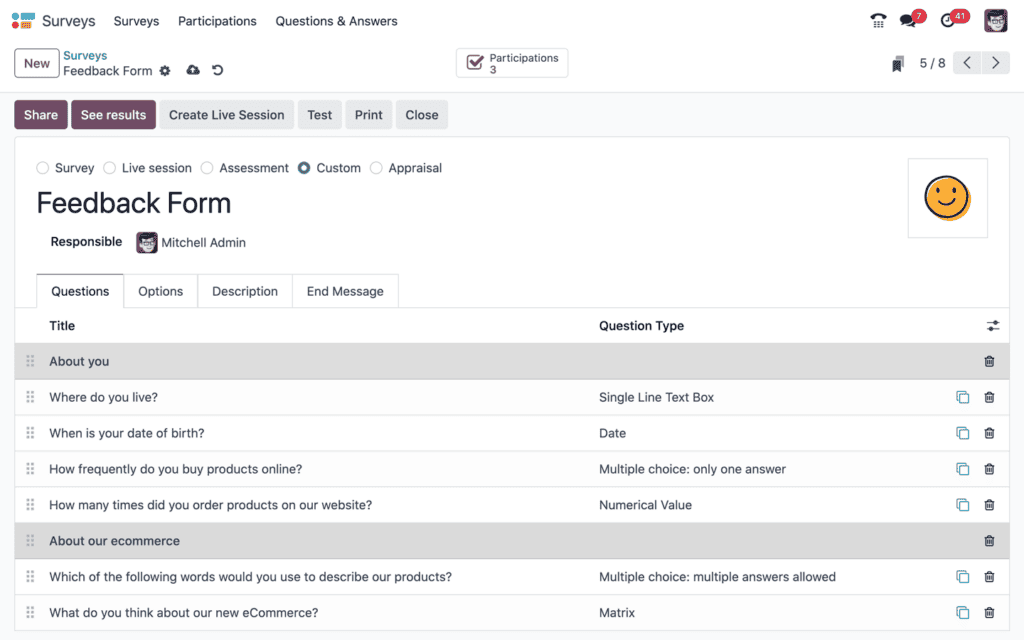
Collecting feedback sounds simple, until the answers are scattered across five different emails, an online form and a flipchart. Odoo Surveys cleans that up. You put the questions together, choose answer types like multiple choice, scale or free text and test the survey before it goes out.
You can distribute it by link, by email to selected contacts or live: in live mode, participants answer the questions on their phones while the results appear on the big screen. The analysis sums everything up in charts, and individual answers stay visible too. That way lots of opinions turn into a picture you can work with.
- Questionnaires: design surveys and test them before sending
- Distribution: collect answers by link or email
- Conditional questions: show follow-up questions only when they fit
- Live sessions: real-time questions with your audience
- Analysis: results as charts and individual answers
Where Odoo Surveys helps in everyday SME life
The carpentry shop that asks customers how satisfied they were after every kitchen installation. The course provider collecting feedback after a seminar. The accounting firm asking its employees what they’d like for the team day. Or the restaurant that wants to know whether the new lunch menu is going down well.
SMEs in the Lucerne region often have a personal line to their customers, but rarely structured feedback. A short, well-made survey delivers numbers where there would otherwise only be a gut feeling. And when the answers are linked to contacts in Odoo, you also know whom to follow up with.
Let’s Doo helps you set up the app, create your first templates and build surveys into the right points of your processes, instead of pulling them out of a hat once a year.
How we bring Odoo Surveys into your business
Consulting
Before a single app gets installed, we look at how your business ticks. So by the end you know exactly whether – and how – Odoo fits you.
Ongoing Support
Odoo is never quite finished – and neither is your business. We stay with you for the long run, keep developing the system and think ahead with you.
Hosting
Fast, secure and compliant with both GDPR and revFADP: we host your Odoo in Switzerland, Germany or Finland – with backups, updates and maintenance. Your own hosting works too.
Support & Training
After go-live, everyday business begins. We’re there for your questions, train new team members and keep your Odoo in shape.
Customization
Odoo can do a lot – but not everything out of the box. We adapt fields, workflows and reports, and build custom modules when the standard isn’t enough.
Implementation
Starting fresh or switching over: from setup and data migration to training, we implement Odoo for you – carefully planned, step by step and never flying blind.
Where else surveys show up in Odoo
Surveys only become really useful when they show up in the process. After an event in Odoo Events, the questionnaire goes out to all participants. In Odoo eLearning surveys serve as an exam or certification at the end of a course, in Odoo Recruitment as a structured interview form. If needed, you send invitations to larger contact groups with Odoo Email Marketing. You always build the questionnaires in the same editor, no matter what they end up being used for.
Go ahead, just ask us
We'll show you how Odoo Surveys fits into your processes. The initial consultation is free and no-obligation, and afterwards we won't ask you for five stars.
FAQ about Odoo Surveys
Your question isn’t here? Ask us directly – the initial consultation is free and without obligation.
Do participants need an account?
No. A survey can be shared via a public link without anyone having to log in. But you can also restrict it to invited contacts.
Can I show questions depending on earlier answers?
Yes, questions can be shown conditionally, depending on what someone answered before. That keeps the survey short for everyone who isn’t affected by certain parts.
What is live mode?
In live mode you run the survey in front of an audience, for example at a workshop. Participants answer on their phones, and you see the results instantly on the screen.