
Odoo Appointments
Customers book themselves. You keep working.
With Odoo Appointments, customers book free time slots online, get automatic reminders and land straight in your calendar – no email ping-pong.
What Odoo Appointments takes off your plate
Online booking, reminders and calendar in one
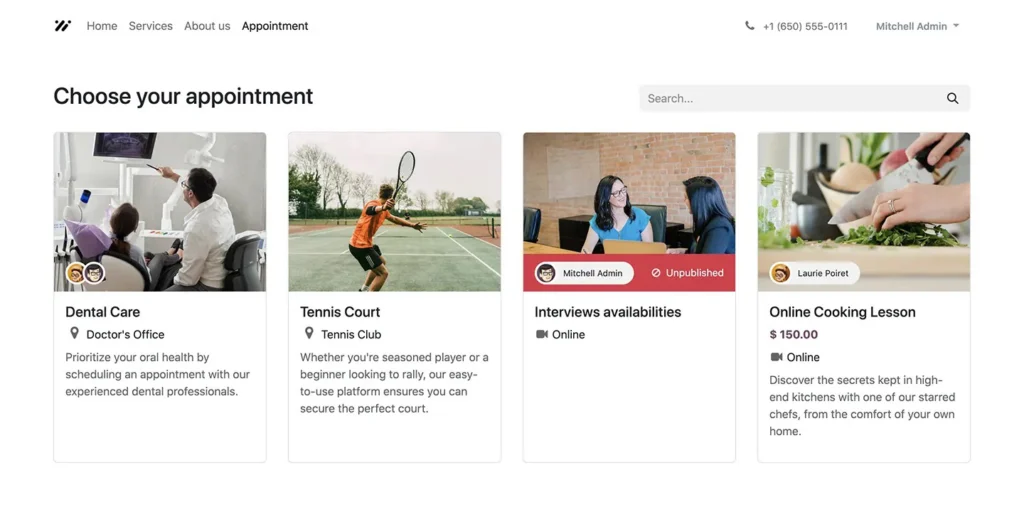
“Does Tuesday at ten work for you?” – “Sorry, no, how about Thursday?” Email threads like that cost time and nerves. With Odoo Appointments, you put your free time slots online, and customers book whatever suits them. Appointments sync with your calendar so nothing gets double-booked.
Automatic confirmations and reminders mean fewer appointments get forgotten. For online meetings, Odoo creates the video call link along the way, and besides people you can also let customers book resources like meeting rooms or tables. Every booking can create a lead in the CRM, and the reports show you which appointment types are most in demand.
- Online booking: customers pick their own appointment
- Calendar sync: aligned with Google and Outlook calendars
- Reminders: automatically before every appointment
- Video and resources: meeting links, rooms and tables
- Leads from bookings: new contacts straight into the CRM
- Reports: see which appointments are in demand
Who Odoo Appointments is made for
For everyone whose business starts with an appointment: the fiduciary holding tax return meetings, the hair salon, the physiotherapy practice, the bike shop with service appointments or the agency setting up initial consultations with new clients. Internal things like employee reviews or meeting room bookings can be organized neatly with it too.
Smaller businesses in Central Switzerland in particular, where the phone always rings when your hands are full, gain a lot: booking runs around the clock through the website, without anyone having to pick up.
Let’s Doo sets up Odoo Appointments for you: defining appointment types, availability and reminders, embedding the booking page in your website and training the team. If you need special questions in the booking form, we build them in.
How we bring Odoo Appointments into your business
Consulting
Before a single app gets installed, we look at how your business ticks. So by the end you know exactly whether – and how – Odoo fits you.
Ongoing Support
Odoo is never quite finished – and neither is your business. We stay with you for the long run, keep developing the system and think ahead with you.
Hosting
Fast, secure and compliant with both GDPR and revFADP: we host your Odoo in Switzerland, Germany or Finland – with backups, updates and maintenance. Your own hosting works too.
Support & Training
After go-live, everyday business begins. We’re there for your questions, train new team members and keep your Odoo in shape.
Customization
Odoo can do a lot – but not everything out of the box. We adapt fields, workflows and reports, and build custom modules when the standard isn’t enough.
Implementation
Starting fresh or switching over: from setup and data migration to training, we implement Odoo for you – carefully planned, step by step and never flying blind.
How Odoo Appointments works with other apps
The booking page lives on your Odoo Website, right where customers are looking for you anyway. Every booking can create a lead in Odoo CRM, so the initial conversation becomes a real sales opportunity. And if you work with prepayment, you connect Appointments with online payment and Odoo Invoicing – then customers pay when they book, and accounting has everything in one place.
Less email ping-pong, more appointments
Let’s use a free, no-obligation initial consultation to look at how your customers can book on their own in the future.
Frequently asked questions about Odoo Appointments
Your question isn’t here? Ask us directly – the initial consultation is free and without obligation.
Does Odoo Appointments work with my Outlook or Google calendar?
Yes, Odoo syncs with both. Whatever you enter there blocks the corresponding time slots for online bookings.
Can customers pay right when they book?
Yes, Odoo Appointments supports payment at booking. That’s worth it for consultations or courses, for example, where last-minute cancellations hurt.
Can I also let customers book rooms or tables?
Yes. Besides people, resources like meeting rooms, equipment or restaurant tables can be set up as bookable.