
Odoo Invoicing
Invoicing is good, getting paid is better
Odoo Invoicing sends invoices with one click, Swiss QR-bill included, and reminds late payers automatically. You do the work, Odoo takes care of the money.
How your money comes in faster
Invoices, payments and reminders without manual work
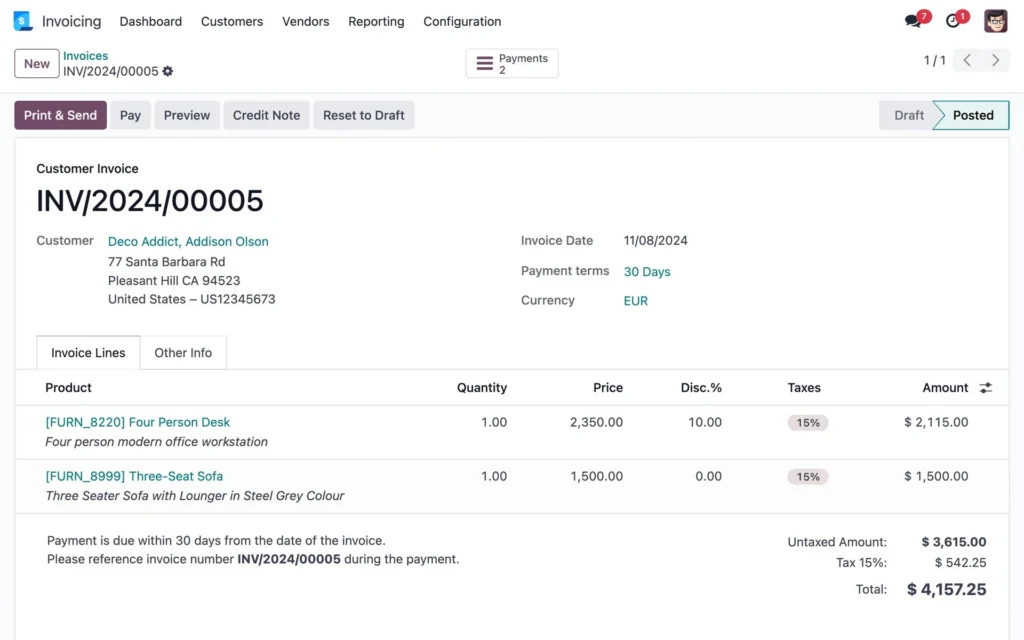
Many SMEs still write invoices in Word, save them as PDFs and then enter incoming payments by hand in a list. Odoo Invoicing turns that into a single click: create the invoice, check it, send it. With the Swiss localization it automatically carries the QR payment slip, with a QR-IBAN if you like.
Customers pay online through the customer portal, Odoo Subscriptions takes care of recurring invoices, and if you sell abroad, you invoice in multiple currencies. You send and receive e-invoices right in the system. If a payment doesn’t arrive, Odoo sends the payment reminder: politely, on time and without you having to work up the nerve.
- One-click sending: invoice by email straight from Odoo
- QR-bill: Swiss payment slip automatically on every invoice
- E-invoices: send and receive electronically
- Customer portal: view and pay invoices online
- Multiple currencies: invoice foreign customers cleanly too
- Payment reminders: automatic instead of awkward on the phone
Who Odoo Invoicing is made for
The app suits service providers and smaller businesses that mainly want one thing: invoice properly and keep an eye on open items. The graphic designer with monthly flat-fee invoices, the IT support office with maintenance contracts or the painting company that bills after every job.
Odoo Invoicing can be a pleasantly small first step into ERP. As the business grows, full accounting comes in later, without you having to start from scratch. For many companies in and around Lucerne, that’s an easy way to get started.
Let’s Doo designs your invoice template in your own layout, sets up bank details, QR-IBAN and VAT, defines the dunning levels and shows your team how invoices and payments work day to day.
How we bring Odoo Invoicing into your business
Consulting
Before a single app gets installed, we look at how your business ticks. So by the end you know exactly whether – and how – Odoo fits you.
Ongoing Support
Odoo is never quite finished – and neither is your business. We stay with you for the long run, keep developing the system and think ahead with you.
Hosting
Fast, secure and compliant with both GDPR and revFADP: we host your Odoo in Switzerland, Germany or Finland – with backups, updates and maintenance. Your own hosting works too.
Support & Training
After go-live, everyday business begins. We’re there for your questions, train new team members and keep your Odoo in shape.
Customization
Odoo can do a lot – but not everything out of the box. We adapt fields, workflows and reports, and build custom modules when the standard isn’t enough.
Implementation
Starting fresh or switching over: from setup and data migration to training, we implement Odoo for you – carefully planned, step by step and never flying blind.
Invoicing as part of Odoo
In Odoo, invoices rarely come out of nowhere. A confirmed quote in Odoo Sales becomes an invoice with one click, hours logged in Odoo Timesheets can be billed directly, and contracts from Odoo Subscriptions invoice themselves on schedule. If you need more than invoices, you can expand to Odoo Accounting later, with bank reconciliation and financial reports. Your invoices simply stay in the system, and you build on what’s already running.
Less chasing, faster cash
Let’s take a quick look at how you invoice today. Free, no-obligation and with no invoice afterward.
Frequently asked questions about Odoo Invoicing
Your question isn’t here? Ask us directly – the initial consultation is free and without obligation.
Do we need Odoo Enterprise for invoicing?
Odoo’s open core can already write invoices. We still recommend Odoo Enterprise: only with it do you get automatic dunning levels, bank reconciliation and financial reports, and you won’t have to switch editions later. We’ll go over what that means for your license in the initial consultation.
Does Odoo create QR-bills for Switzerland?
Yes. With the Swiss localization, every invoice carries the QR payment slip, including with a QR-IBAN, so your customers can pay conveniently via e-banking.
Can I automate payment reminders?
Yes. You define dunning levels with deadlines and texts, and Odoo sends the reminders automatically as soon as an invoice is overdue.