
Odoo Timesheets
Every hour counts, so count every hour
With Odoo Timesheets, you log hours with a timer or in a grid, straight onto projects and tasks. Reminders make sure nothing gets forgotten, and billable time ends up on the invoice.
How time tracking works in Odoo
Logged quickly, checked properly, billed correctly
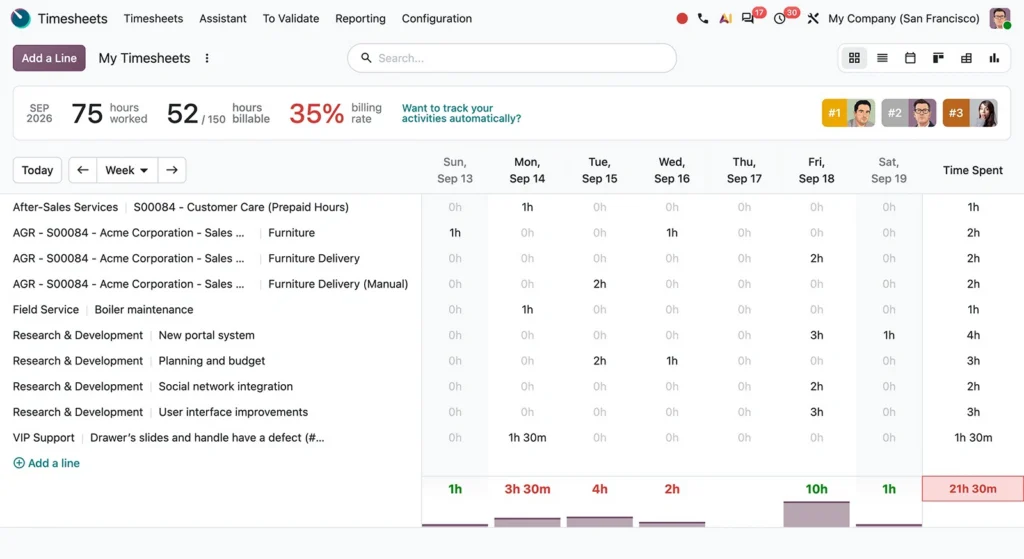
Friday afternoon, reconstructing the week: what was it again on Tuesday? Odoo Timesheets puts an end to that. Whoever is working on something starts the timer and stops it afterward. If you prefer to log everything in one go, you fill in the grid view, one row per project, one column per day.
Automatic reminders nudge everyone who hasn’t entered their hours yet. The project lead reviews and validates the entries before they’re used further. You book billable hours directly onto orders so they show up on the next invoice. And the reports show where your time actually goes, not just where it should go.
- Timer: start and stop time with one click
- Grid: log a whole week quickly in one overview
- Reminders: flag missing hours and validate entries
- Billing: book billable hours directly onto orders
- Reports: see where your time actually goes
It’ll get even faster on the Mac, iPhone and Apple Watch: with our app Let’s Doo Track, coming soon to the App Store, you start the timer right from the menu bar, and the hours still land in Odoo.
Who benefits from Odoo Timesheets
Everyone who sells time. The accounting firm that bills client mandates by the hour. The ad agency with hourly budgets per client. The engineering firm, the IT service provider, the electrician with time-and-materials jobs. In all of them, a forgotten quarter of an hour decides the margin.
But businesses that don’t bill by the hour benefit too: if you know how long a job really took, you calculate the next quote more accurately and see in black and white which work pays off. Whether it’s an office in Lucerne or a workshop in the Seetal: logging works on the computer just as well as on the phone.
Let’s Doo sets up time tracking to fit your projects and orders, defines reminders and approvals with you and shows your team how logging is done in just a few clicks.
How we bring Odoo Timesheets into your business
Consulting
Before a single app gets installed, we look at how your business ticks. So by the end you know exactly whether – and how – Odoo fits you.
Ongoing Support
Odoo is never quite finished – and neither is your business. We stay with you for the long run, keep developing the system and think ahead with you.
Hosting
Fast, secure and compliant with both GDPR and revFADP: we host your Odoo in Switzerland, Germany or Finland – with backups, updates and maintenance. Your own hosting works too.
Support & Training
After go-live, everyday business begins. We’re there for your questions, train new team members and keep your Odoo in shape.
Customization
Odoo can do a lot – but not everything out of the box. We adapt fields, workflows and reports, and build custom modules when the standard isn’t enough.
Implementation
Starting fresh or switching over: from setup and data migration to training, we implement Odoo for you – carefully planned, step by step and never flying blind.
The link between work and invoice
Time tracking is the link between work and money. Hours are logged on tasks in Odoo Project or on jobs in Odoo Field Service. Billable hours flow through Odoo Sales into Odoo Invoicing. And in Helpdesk, hours can be logged on tickets so support effort becomes visible too. At the same time, the hours provide the basis for project budgets and reports, without anyone keeping a second list.
Take a moment for us
We’ll show you what time tracking in Odoo could look like for your business. The initial consultation is free and no-obligation, and you don’t have to log the time anywhere.
Frequently asked questions about Odoo Timesheets
Your question isn’t here? Ask us directly – the initial consultation is free and without obligation.
Does this also track working hours and attendance?
Odoo Timesheets records hours on projects and tasks. For clocking in and out, Odoo has the separate Attendances app, which combines well with it.
Can employees log time on the go?
Yes, Timesheets works in the browser and in the Odoo app on your phone. That way hours can be entered right after the appointment at the customer’s.
Who checks the logged hours?
You decide who validates entries, for example the project lead. Validated hours are locked for employees and ready for billing.