
Odoo Project
Projects under control, not stuck in your inbox
With Odoo Project, you plan tasks, milestones and deadlines, see who’s working on what and keep an eye on hours, costs and budget. From the Kanban board to the Gantt chart.
Project management with Odoo: what the app takes off your plate
Planning, collaboration and numbers in one app
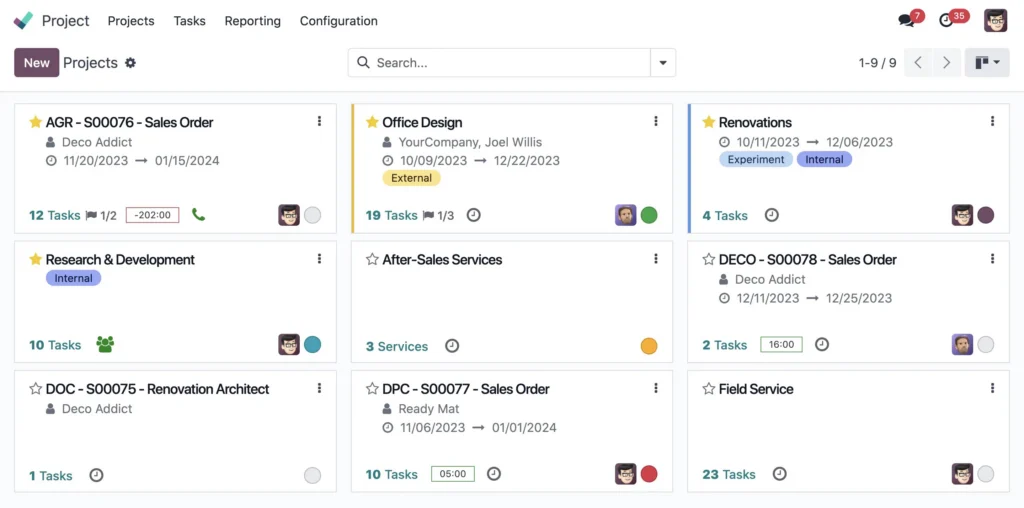
Projects rarely fail because of the work itself, but because of the question: who does what by when, and where does it actually stand? Odoo Project gives every project a clear structure with tasks, subtasks and milestones. Depending on your preference, you work in Kanban, in a list, in a Gantt chart or in the calendar – the data is always the same.
Discussions happen in the chatter right on the task, including files and mentions, instead of in scattered emails. Whoever logs hours on tasks feeds the budget at the same time. So you always see what a project costs and what it brings in. Project templates save time on recurring jobs, and reports show where things get stuck.
- Views: Kanban, list, Gantt and calendar as needed
- Structure: tasks, subtasks and milestones
- Chatter: agreements and files right on the task
- Budgets: track timesheets and budget per project
- Profitability: costs and revenue always in view
- Templates and reports: set up recurring projects faster
Who Odoo Project is made for
For everyone who thinks in jobs rather than assembly-line goods. The agency with many client projects running in parallel. The engineering firm with long planning phases. The metalworker who sees a staircase through from quote to installation. The IT company handling implementations and support packages. Or the fiduciary who runs every year-end closing as a small project.
In SMEs in and around Lucerne, the project lead is often in sales and on the construction site at the same time. That’s where it helps to have a tool that works on a phone just as well as in the office and doesn’t have to wait until the end of the month to be fed numbers.
Let’s Doo sets up your project stages, templates and access rights, connects projects with timesheets and invoicing and trains your project leads so the tool actually gets used day to day.
How we bring Odoo Project into your business
Consulting
Before a single app gets installed, we look at how your business ticks. So by the end you know exactly whether – and how – Odoo fits you.
Ongoing Support
Odoo is never quite finished – and neither is your business. We stay with you for the long run, keep developing the system and think ahead with you.
Hosting
Fast, secure and compliant with both GDPR and revFADP: we host your Odoo in Switzerland, Germany or Finland – with backups, updates and maintenance. Your own hosting works too.
Support & Training
After go-live, everyday business begins. We’re there for your questions, train new team members and keep your Odoo in shape.
Customization
Odoo can do a lot – but not everything out of the box. We adapt fields, workflows and reports, and build custom modules when the standard isn’t enough.
Implementation
Starting fresh or switching over: from setup and data migration to training, we implement Odoo for you – carefully planned, step by step and never flying blind.
Odoo Project and the rest of Odoo
Odoo Project really comes into its own in combination. Hours come from Odoo Timesheets, and a confirmed order in Odoo Sales can automatically create a project or a task. Billing runs through Odoo Invoicing, based on time spent or on milestones. If you need to spread people across several projects, you schedule their assignments with Odoo Planning. That way task, hours and invoice are connected, and nobody has to copy numbers from one app to the next.
Your next project: Odoo Project
Show us how you plan today, and we’ll show you how it gets easier with Odoo. The initial consultation is free and no-obligation.
Frequently asked questions about Odoo Project
Your question isn’t here? Ask us directly – the initial consultation is free and without obligation.
Can customers see the project status?
Yes, through the customer portal you can share selected projects and tasks with customers. They see the status and can comment, without you writing status emails.
What’s the difference between Odoo Project and Odoo Planning?
Project organizes tasks and their progress. Planning assigns employees to shifts and assignments, including across several projects. Many businesses use both together.
Can we bill projects based on time spent?
Yes. Hours logged on tasks can be invoiced directly through Sales and Invoicing.