
Odoo Planning
Who works when – without the spreadsheet puzzle
Odoo Planning schedules shifts, assignments and equipment on one timeline, warns you about double bookings and lets your team swap shifts on their own.
Shift and staff scheduling with Odoo Planning
Shifts, assignments and equipment on one timeline
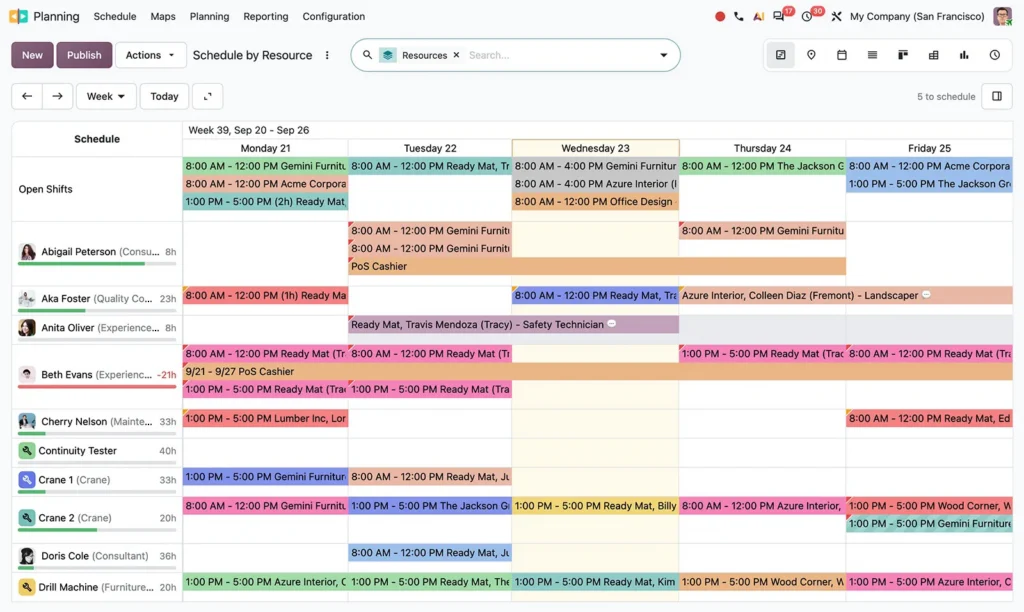
The weekly schedule hangs printed out in the break room, the changes are in the group chat, and the temp never saw the latest version? Odoo Planning puts everything on one shared timeline. With templates, you create recurring shifts in a few clicks, and auto-planning assigns open shifts to available people.
You don’t just plan people, but also equipment like vehicles, machines or rooms. Odoo spots conflicts before anyone is double-booked and takes recorded time off into account. Employees see their schedule online and can swap shifts among themselves. At the end, pivot tables show you how well the planning worked out.
- Shift templates: create recurring shifts in seconds
- Auto-planning: assign open shifts to the right people
- Staff and equipment: schedule people, vehicles and machines
- Conflict check: double bookings stand out immediately
- Shift swaps: employees handle changes themselves
- Analysis: planning and utilization in pivot tables
Where Odoo Planning makes the difference
Anywhere work happens in shifts or assignments: in the restaurant with early and late shifts, in retail with part-timers and Saturday help, at the cleaning company with changing sites, or in metalwork, where the installation crew and the aerial lift need to be available at the same time.
Excel and a whiteboard work – until someone gets sick. With Odoo Planning, you simply move the shift, and the whole team sees the change right away. Whether it’s a restaurant on Lake Lucerne or a trade business in the Lucerne hinterland: a schedule everyone can rely on saves phone calls and misunderstandings every week.
Let’s Doo implements Odoo Planning for you: creating roles and shift templates, setting rules for auto-planning, training planners and the team. If your business needs special logic, for example for qualifications, we customize Odoo.
How we bring Odoo Planning into your business
Consulting
Before a single app gets installed, we look at how your business ticks. So by the end you know exactly whether – and how – Odoo fits you.
Ongoing Support
Odoo is never quite finished – and neither is your business. We stay with you for the long run, keep developing the system and think ahead with you.
Hosting
Fast, secure and compliant with both GDPR and revFADP: we host your Odoo in Switzerland, Germany or Finland – with backups, updates and maintenance. Your own hosting works too.
Support & Training
After go-live, everyday business begins. We’re there for your questions, train new team members and keep your Odoo in shape.
Customization
Odoo can do a lot – but not everything out of the box. We adapt fields, workflows and reports, and build custom modules when the standard isn’t enough.
Implementation
Starting fresh or switching over: from setup and data migration to training, we implement Odoo for you – carefully planned, step by step and never flying blind.
Planning that talks to the rest of Odoo
Vacation and sick days from Odoo Time Off flow straight into the schedule, so nobody gets assigned who isn’t even there. Planned hours can be confirmed in Odoo Timesheets and billed through Odoo Project. And if you organize on-site jobs at customers’ premises, you connect planning with Odoo Field Service – so order, team and time slot fit together, and nobody has to update the schedule in three systems.
Bye-bye, shift schedule spreadsheet
Show us how you plan today – in a free, no-obligation initial consultation, we’ll sketch out what it looks like with Odoo Planning.
Frequently asked questions about Odoo Planning
Your question isn’t here? Ask us directly – the initial consultation is free and without obligation.
Can employees see their schedule on their phone too?
Yes. Everyone sees their shifts online and can have the published schedule sent to them by email.
Does Odoo Planning also schedule machines and vehicles?
Yes, besides people you can also plan equipment as a resource. That way you see, for example, when the delivery van or the aerial lift is already booked.
Do we need Odoo Enterprise for this?
Yes, Odoo Planning is part of Odoo Enterprise. In the initial consultation, we’ll work out which apps you really need.