
Odoo Field Service
From order to job to invoice
With Odoo Field Service, you plan jobs on a calendar and a map, your technicians log time, materials and signatures on their phones, and the invoice is out before the van is back. From Odoo 20 on, Field Service is part of Odoo Planning.
What Odoo Field Service handles out in the field and back at the office
Planning at the office, reports on site, invoices right away
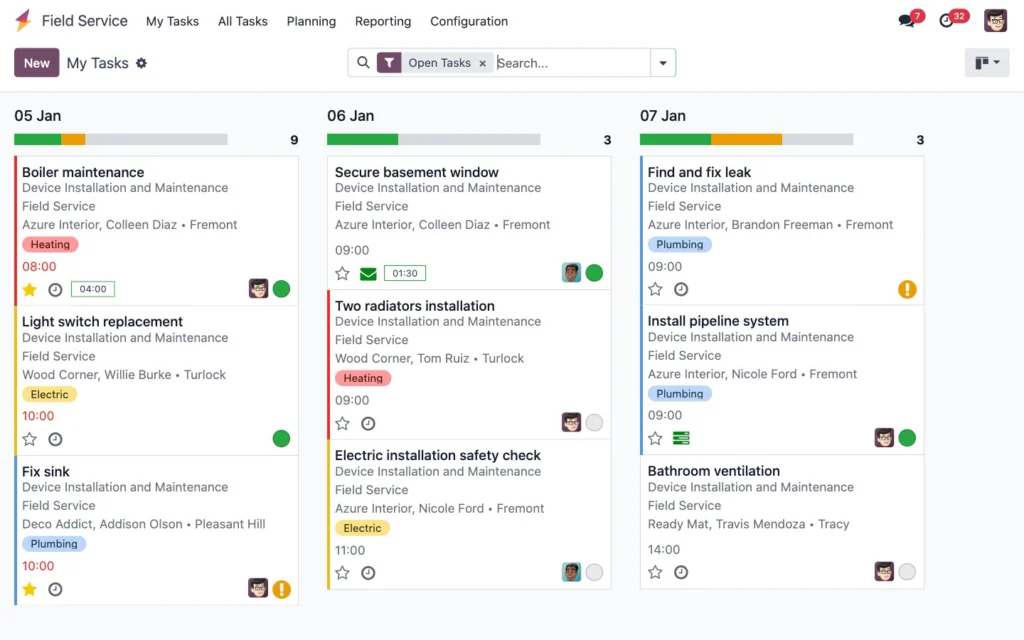
The planning board hangs in the office, the technician writes the job report on paper out in the field, and days later someone tries to turn it into an invoice. Odoo Field Service gets everyone on the same page. Good to know: from Odoo 20 on, Field Service is no longer an app of its own – its features then live in Odoo Planning. You plan jobs on the calendar, in the Gantt chart or on the map, so the routes make sense too. When an order comes in from Sales, the task is created automatically.
On site, the team works with the mobile app: log time, record the products used, fill out the worksheet and have the customer sign it. Back at the office, everything is already there. Materials and hours can be billed directly, without anyone retyping notes.
- Job planning: on the calendar, in the Gantt chart and on the map
- Mobile app: everything technicians need on the road
- Time tracking: log hours right on site
- Job report: worksheet with the customer’s signature
- Materials: record and bill the products used
- Automatic: tasks are created from sales orders
Who gets the most out of Odoo Field Service
For businesses whose work happens at the customer’s place. The heating and plumbing installer with maintenance contracts, the electrician with service calls, the blinds and gates company, the ventilation specialist or the IT support team looking after devices on site. The rule is the same everywhere: the less paper between job and invoice, the better.
And in Central Switzerland, where the drive from Lucerne to the Entlebuch simply doesn’t take five minutes, a well-planned route pays off twice over. Recording everything on site also saves you the second trip just because a signature is missing.
Let’s Doo sets up Odoo Field Service with worksheets, products and billing rules, gets the app onto your technicians’ phones and trains both the office and the team, so the switch from paper actually works.
How we bring Odoo Field Service into your business
Consulting
Before a single app gets installed, we look at how your business ticks. So by the end you know exactly whether – and how – Odoo fits you.
Ongoing Support
Odoo is never quite finished – and neither is your business. We stay with you for the long run, keep developing the system and think ahead with you.
Hosting
Fast, secure and compliant with both GDPR and revFADP: we host your Odoo in Switzerland, Germany or Finland – with backups, updates and maintenance. Your own hosting works too.
Support & Training
After go-live, everyday business begins. We’re there for your questions, train new team members and keep your Odoo in shape.
Customization
Odoo can do a lot – but not everything out of the box. We adapt fields, workflows and reports, and build custom modules when the standard isn’t enough.
Implementation
Starting fresh or switching over: from setup and data migration to training, we implement Odoo for you – carefully planned, step by step and never flying blind.
Field Service working together with Sales, Inventory and Invoicing
In field service, a lot of threads come together. A job often starts in Odoo Sales or as a ticket in Odoo Helpdesk. The materials used come from Odoo Inventory and are correctly deducted from stock there. In the end, hours and products become an invoice in Odoo Invoicing, without anyone having to retype a thing. The technicians’ hours land in Timesheets automatically, and the office can see at any time which jobs are done.
Less paperwork, earlier evenings
Tell us how your jobs run today. The initial consultation is free and no-obligation – even if you’re standing on a construction site right now.
Frequently asked questions about Odoo Field Service
Your question isn’t here? Ask us directly – the initial consultation is free and without obligation.
Do the technicians need a special device?
No, the Odoo app runs on common smartphones and tablets. All they need is a login and a short introduction.
Can customers sign right there on site?
Yes, the worksheet is shown on the device and the customer signs it digitally. The signed document is then attached to the job.
Do we need Odoo Enterprise for Odoo Field Service?
Yes, Odoo Field Service is part of Odoo Enterprise, the edition we recommend. From Odoo 20 on, the field service features continue in Odoo Planning. In the initial consultation, we look at which apps fit your business.