
Odoo Helpdesk
Every ticket lands. None gets lost.
Odoo Helpdesk collects requests from email, web forms, live chat and WhatsApp in one ticketing system – prioritized, assigned and answered faster with AI help.
What your support team gains with Odoo Helpdesk
From inbox chaos to a clean ticket board
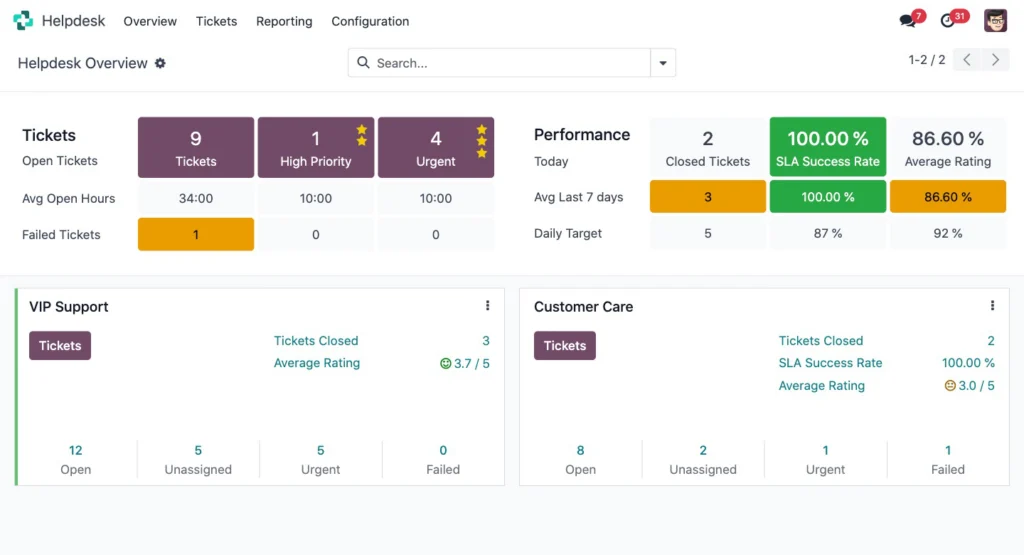
Sound familiar? A complaint comes in by email to info@, the follow-up question via WhatsApp to the boss’s phone, and by Friday nobody remembers who was going to reply. Odoo Helpdesk turns every request into a ticket with a clear owner, priority and history – no matter which channel it comes in through.
With SLAs, you define how quickly each kind of request needs an answer, and automations and reply templates take the routine off your team’s hands. The AI suggests replies that you just review and send. And because the helpdesk is part of the ERP, you see right on the ticket which quotes, invoices or contracts belong to the customer.
- Ticket board: track, prioritize and resolve requests
- All channels: email, web form, live chat and WhatsApp
- SLAs: set response times, keep deadlines in view
- Automation and templates: routine replies in seconds
- AI replies: suggestions your team just reviews
- Support contracts: sell support as a product of its own
Who benefits from a ticketing system in Odoo
Odoo Helpdesk gets interesting as soon as more than one person answers customer requests. For example at the software company with maintenance contracts, the online retailer with returns and delivery questions, or the machine builder whose customers ask for spare parts and service visits. Anywhere a shared inbox and a good memory carry the support today.
Small teams benefit too: a self-service knowledge base answers the classics before they even reach the inbox. Especially in SMEs in Central Switzerland, where the same people sell and look after customers, a clear owner per ticket brings a lot of calm to the team.
Let’s Doo sets up Odoo Helpdesk for your business: connecting channels, defining teams and SLAs, writing templates and training your team. If your processes need something special, we customize the app.
How we bring Odoo Helpdesk into your business
Consulting
Before a single app gets installed, we look at how your business ticks. So by the end you know exactly whether – and how – Odoo fits you.
Ongoing Support
Odoo is never quite finished – and neither is your business. We stay with you for the long run, keep developing the system and think ahead with you.
Hosting
Fast, secure and compliant with both GDPR and revFADP: we host your Odoo in Switzerland, Germany or Finland – with backups, updates and maintenance. Your own hosting works too.
Support & Training
After go-live, everyday business begins. We’re there for your questions, train new team members and keep your Odoo in shape.
Customization
Odoo can do a lot – but not everything out of the box. We adapt fields, workflows and reports, and build custom modules when the standard isn’t enough.
Implementation
Starting fresh or switching over: from setup and data migration to training, we implement Odoo for you – carefully planned, step by step and never flying blind.
How Odoo Helpdesk works with other apps
Chats from Odoo Live Chat and messages via WhatsApp turn straight into tickets. If you bill support time, you log it on the ticket with Odoo Timesheets. If a case needs an on-site visit, you schedule it in Odoo Field Service, and you store the answer to the next similar question in Odoo Knowledge. That way every solved ticket makes the next day a little easier.
No more “Who replied to them?”
Tell us how your support runs today – in a free, no-obligation initial consultation, we’ll show you how Odoo Helpdesk fits in.
Frequently asked questions about Odoo Helpdesk
Your question isn’t here? Ask us directly – the initial consultation is free and without obligation.
Can we keep using our existing support email address?
Yes. An address like support@ is connected to Odoo, and every incoming email automatically becomes a ticket. Your customers won’t notice a thing, except that replies come faster.
How exactly does AI help in support?
It drafts suggested replies to a ticket, which your team reviews, adjusts and sends. A human always has the final say.
Do we need Odoo Enterprise for Odoo Helpdesk?
Yes, Odoo Helpdesk is part of Odoo Enterprise, the edition we recommend. In the initial consultation, we’ll work out which apps you really need.