
Odoo Live Chat
Hi, can I help? And right away, too.
Odoo Live Chat gets you talking to visitors while they’re still on your website. Questions turn into leads or tickets – no copy and paste required.
What Odoo Live Chat does for your team
Real-time help with a chatbot and canned responses
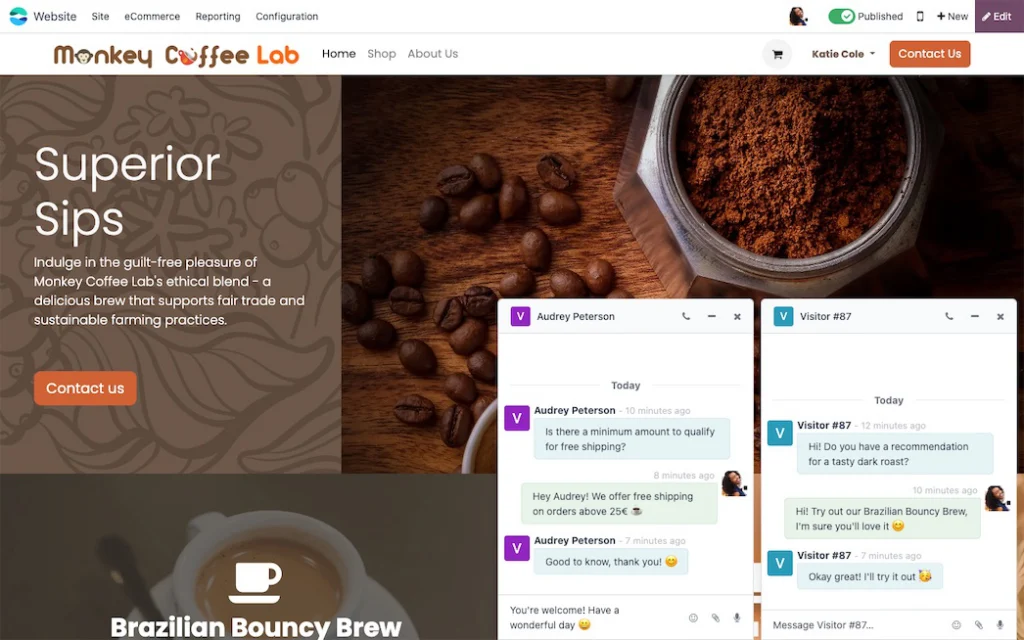
Visitors who have a question on your website and can’t find the answer rarely send an email. They leave. Odoo Live Chat opens a small chat window, and your team answers in real time straight from Odoo. New conversations are assigned to whoever is available, and standard answers about opening hours or delivery times go in with a shortcut.
If nobody has time right now, a chatbot takes over: it asks the first questions, answers simple ones itself and collects contact details. With a single command, you turn a conversation into a lead in the CRM or a ticket in Helpdesk. And at the end, visitors rate the chat, so you can see how good you really are.
- Real time: help website visitors directly in the chat
- Chatbot: automatic answers, even when nobody is online
- Canned responses: insert prewritten answers with a shortcut
- Multiple channels: separate chats per website or team
- Lead or ticket: create one straight from the conversation
- Reporting: ratings and metrics on chat quality
Who benefits from a live chat
For anyone whose customers have questions before they buy. The online retailer whose visitors want to know whether the spare part fits their model. The auto body shop that wants to quickly check whether the damage needs an appointment. The IT service provider whose prospects would rather chat for a minute than fill out a form.
A live chat feels personal when real people answer. Especially for an SME from the Lucerne region, where customers value a direct line, that’s an advantage over anonymous big players.
Let’s Doo sets up Odoo Live Chat on your website, builds chatbot flows and canned responses, routes inquiries sensibly within your team and shows you in a training session how chats turn into leads.
How we bring Odoo Live Chat into your business
Consulting
Before a single app gets installed, we look at how your business ticks. So by the end you know exactly whether – and how – Odoo fits you.
Ongoing Support
Odoo is never quite finished – and neither is your business. We stay with you for the long run, keep developing the system and think ahead with you.
Hosting
Fast, secure and compliant with both GDPR and revFADP: we host your Odoo in Switzerland, Germany or Finland – with backups, updates and maintenance. Your own hosting works too.
Support & Training
After go-live, everyday business begins. We’re there for your questions, train new team members and keep your Odoo in shape.
Customization
Odoo can do a lot – but not everything out of the box. We adapt fields, workflows and reports, and build custom modules when the standard isn’t enough.
Implementation
Starting fresh or switching over: from setup and data migration to training, we implement Odoo for you – carefully planned, step by step and never flying blind.
Live chat meets CRM and Helpdesk
The chat runs on your Odoo Website, and your team sees which page an inquiry comes from. Buying interest moves into Odoo CRM as a lead with a single command, a problem goes to Odoo Helpdesk as a ticket. In Odoo Discuss, chats sit next to internal messages, so your team answers everything in one place and no conversation gets lost between two windows.
No more silent website visitors
We’ll show you what Odoo Live Chat would look like on your website. The initial consultation is free and no-obligation.
Frequently asked questions about Odoo Live Chat
Your question isn’t here? Ask us directly – the initial consultation is free and without obligation.
What happens when nobody is online?
Then the chatbot takes over, or the chat window isn’t shown at all. You decide whether contact details are collected outside office hours or the chat takes a break.
Can several people chat at the same time?
Yes, several team members can take chats, and Odoo assigns new conversations to whoever is available.
Do I need an Odoo Website for this?
No, the chat can also be embedded in an existing website with a code snippet. With an Odoo Website, though, the integration is tightest.