
Odoo Discuss
Talk where the work happens
Odoo Discuss brings chats, channels, calls and notifications together right in your ERP – every message sits where it belongs.
Everything that comes together in Odoo Discuss
Chat, inbox and meetings without an extra tool
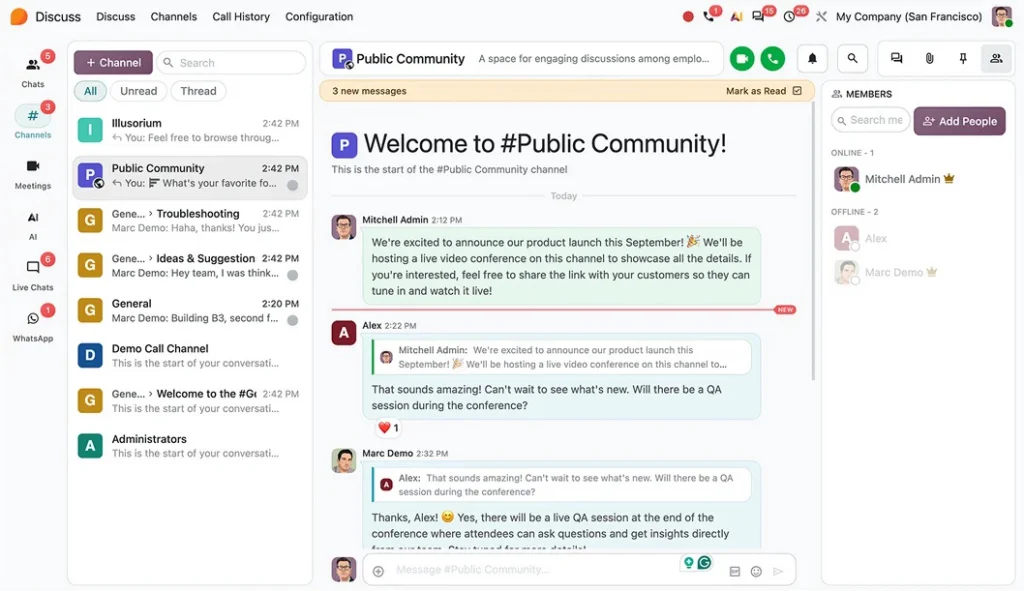
The question about the order is in an email, the answer in a messenger app, and the file is somewhere in last month’s chat. Odoo Discuss cleans that up: channels for teams and topics, direct messages for quick things in between and an inbox where all notifications from Odoo land – mentions, activities, comments on records.
Because Discuss is built into Odoo, you don’t talk in a vacuum, but right on the quote, the project or the delivery slip. Through the email gateway, external emails land on the right record, WhatsApp can be connected, and when you need to sort something out, you start calls or meetings straight from the chat. The presence status shows who’s available right now.
- Channels and direct messages: for teams, topics and quick questions
- Inbox: all notifications in one place
- Calls and meetings: start them straight from the chat
- Email gateway: external emails land on the right record
- WhatsApp: customer messages in the same system
- Files and status: share files and see who’s available
When Odoo Discuss pays off for your team
As soon as your business works with Odoo, Discuss is included anyway – the question is more how consistently you use it. It helps most for teams spread between office, workshop and job site: the carpentry shop where production planning has questions for the installers, or the trading company where sales and warehouse coordinate deliveries all day long.
Instead of scattering information across private messenger apps, everything stays in the business and on the right order. For SMEs in Lucerne and Central Switzerland that don’t want customer data spread across private phones, that’s a real plus.
Let’s Doo shows your team how Discuss makes sense day to day: setting up channels sensibly, configuring the email gateway, tuning notifications so they help instead of annoy – and giving everyone short, hands-on training.
How we bring Odoo Discuss into your business
Consulting
Before a single app gets installed, we look at how your business ticks. So by the end you know exactly whether – and how – Odoo fits you.
Ongoing Support
Odoo is never quite finished – and neither is your business. We stay with you for the long run, keep developing the system and think ahead with you.
Hosting
Fast, secure and compliant with both GDPR and revFADP: we host your Odoo in Switzerland, Germany or Finland – with backups, updates and maintenance. Your own hosting works too.
Support & Training
After go-live, everyday business begins. We’re there for your questions, train new team members and keep your Odoo in shape.
Customization
Odoo can do a lot – but not everything out of the box. We adapt fields, workflows and reports, and build custom modules when the standard isn’t enough.
Implementation
Starting fresh or switching over: from setup and data migration to training, we implement Odoo for you – carefully planned, step by step and never flying blind.
Discuss as the common thread through Odoo
Discuss is in every app: comments in Odoo CRM, questions about tasks in Odoo Project or internal notes on a ticket in Odoo Helpdesk all land in the same inbox. With Odoo WhatsApp, even customer messages join in. So you don’t have to open five tools to know what’s going on today – one look at Discuss is enough, and you know where you’re needed today.
Less chat chaos, more clarity
In a free, no-obligation initial consultation, we show you how Odoo Discuss brings your communication together.
FAQ about Odoo Discuss
Your question isn’t here? Ask us directly – the initial consultation is free and without obligation.
Does Odoo Discuss replace tools like Teams or Slack?
For internal communication around your work in Odoo, often yes: chats, channels, calls and meetings are all included. Whether you replace an existing tool completely depends on how much you use it with external people today.
Which Odoo edition do we need for Odoo Discuss?
Discuss is part of Odoo’s open core and is included in every edition. Extensions like the WhatsApp integration, however, require Odoo Enterprise, which we recommend for your whole business.
Can customers and suppliers join the conversation in Odoo Discuss?
Through the email gateway they simply reply by email, and their replies land on the right record in Odoo. They don’t need their own login for that.