
Odoo WhatsApp
Message your customers where they already are
Odoo WhatsApp brings your WhatsApp Business number into the ERP. Confirmations, reminders and replies go out straight from your Odoo apps, with the history on the right record.
What Odoo WhatsApp handles day to day
From the chat on your phone into the ERP
In many businesses WhatsApp has been in use for ages, unfortunately on the boss’s private phone. The arrangement with the customer is then invisible to everyone else, and when he’s on vacation, everything grinds to a halt. Odoo WhatsApp brings communication to where it belongs: on the contact, the order or the ticket in your ERP.
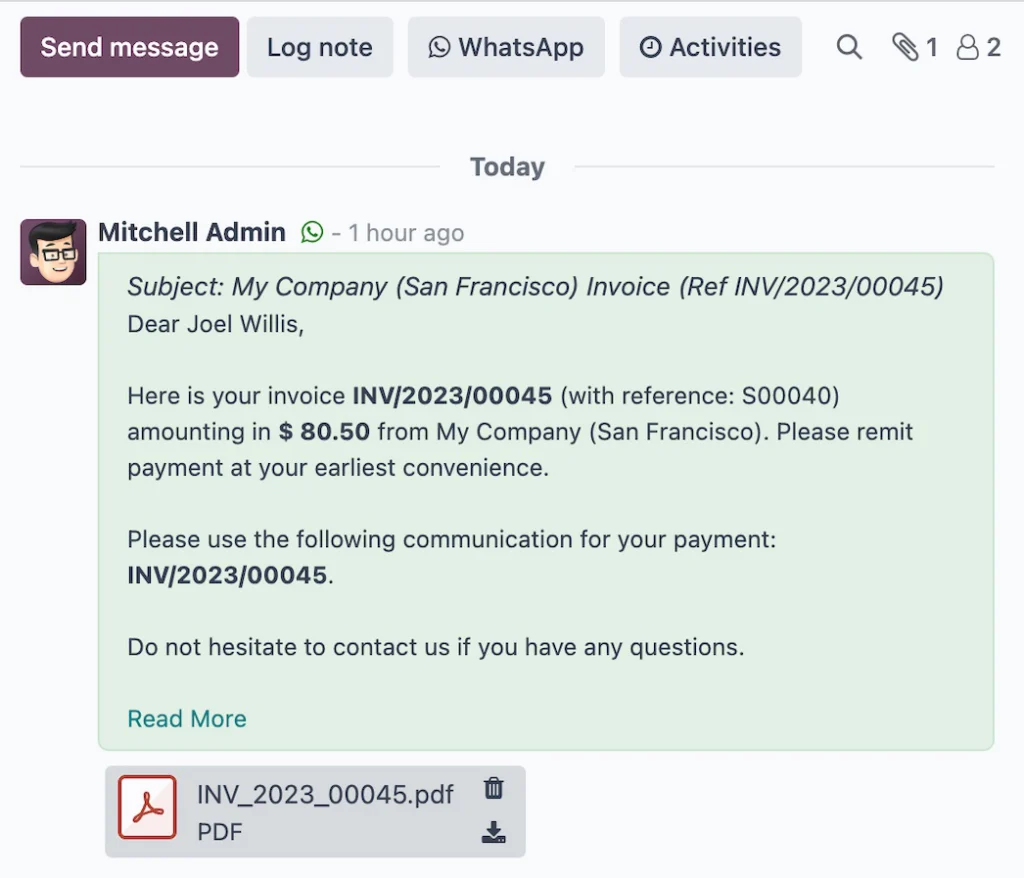
You connect your WhatsApp Business number and send messages from within the Odoo apps, such as an order confirmation or an appointment reminder. Recurring texts are saved as templates. For news to many contacts there’s bulk sending, and incoming replies land in Odoo Discuss, together with your other channels.
- Business number: connect your WhatsApp Business number to Odoo
- Everywhere: integrated into all Odoo apps
- Bulk sending: send announcements efficiently to many contacts
- Templates: define recurring messages once, use them often
- One inbox: multichannel communication gathered in Odoo Discuss
Who benefits from WhatsApp in Odoo
For everyone whose customers would rather type than call. The body shop letting you know the car is ready for pickup. The plumbing business confirming the appointment the day before. The furniture store coordinating the delivery date. Or the online shop where customers ask where their package is.
What matters is that conversations no longer depend on individual phones. If someone is out sick, a colleague picks up the thread, because the history is in the system. For SMEs in Central Switzerland that rely on fast, personal contact, that’s a real win, without any group chat chaos.
Let’s Doo guides you through setting up the WhatsApp Business account, connects it with Odoo, creates the first templates with you and trains the team on using Discuss.
How we bring Odoo WhatsApp into your business
Consulting
Before a single app gets installed, we look at how your business ticks. So by the end you know exactly whether – and how – Odoo fits you.
Ongoing Support
Odoo is never quite finished – and neither is your business. We stay with you for the long run, keep developing the system and think ahead with you.
Hosting
Fast, secure and compliant with both GDPR and revFADP: we host your Odoo in Switzerland, Germany or Finland – with backups, updates and maintenance. Your own hosting works too.
Support & Training
After go-live, everyday business begins. We’re there for your questions, train new team members and keep your Odoo in shape.
Customization
Odoo can do a lot – but not everything out of the box. We adapt fields, workflows and reports, and build custom modules when the standard isn’t enough.
Implementation
Starting fresh or switching over: from setup and data migration to training, we implement Odoo for you – carefully planned, step by step and never flying blind.
WhatsApp across your Odoo apps
In Odoo, WhatsApp isn’t a silo of its own, but a channel that shows up everywhere. The order confirmation goes out from Odoo Sales, the reminder before the visit from Odoo Appointments. Your team handles inquiries in Odoo Discuss together with chat and email. And from tickets in Odoo Helpdesk you keep customers up to date via WhatsApp too. Every message stays visible on its record, even for those who didn’t write it themselves.
Message us. The old-fashioned way works too.
We'll show you how to set up WhatsApp cleanly in your Odoo. The initial consultation is free and no-obligation.
FAQ about Odoo WhatsApp
Your question isn’t here? Ask us directly – the initial consultation is free and without obligation.
Do we need a WhatsApp Business account?
Yes, Odoo uses Meta’s WhatsApp Business Platform. We’ll tackle setting up the account and connecting it to Odoo together with you.
Why do templates have to be approved?
Messages you send to customers on your own initiative go through templates on WhatsApp, which Meta reviews in advance. Once a customer replies, you can write back freely for a while.
Is Odoo WhatsApp included in every edition?
No, the WhatsApp integration is part of Odoo Enterprise, the edition we recommend. We’ll clarify what the WhatsApp Business account requires in the initial consultation.