
Odoo Inventory
Less searching, more shipping
Odoo Inventory shows you what’s where at any time, reorders automatically and guides your team through receiving, picking and shipping with a barcode scanner.
What Odoo Inventory keeps under control
From receiving to the parcel, with real-time stock
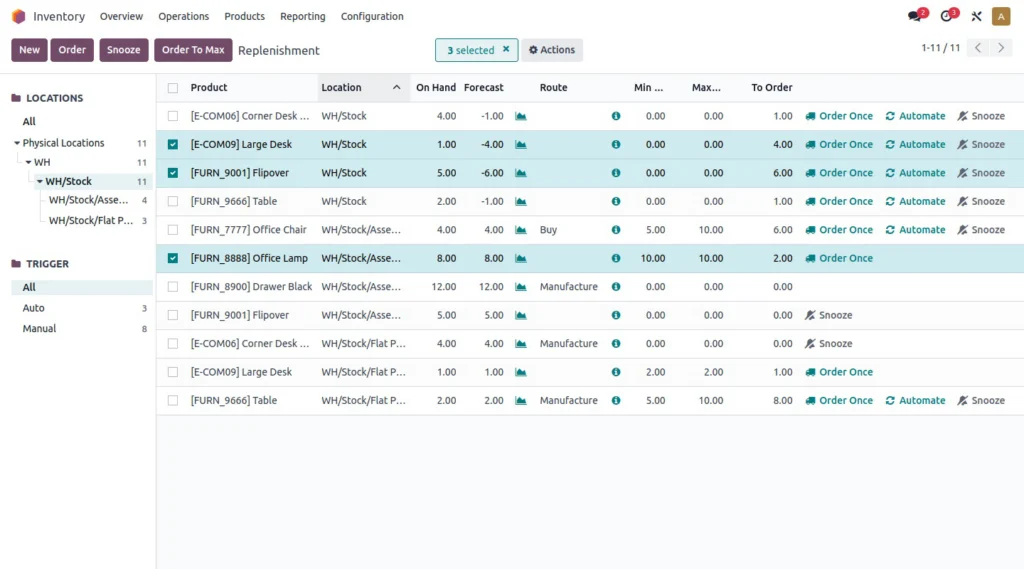
“Do we still have that in stock?” If the answer involves a walk to the shelf, it’s time for a warehouse management system. Odoo Inventory tracks your stock in real time, even across multiple locations. When an item drops below its minimum stock, Odoo suggests a reorder or triggers it automatically.
At receiving, you check the goods, put them away and add a quality check in between if needed. For picking, wave, cluster and batch picking help so nobody walks past the same shelf five times. Barcodes handle booking, packing and shipping, lot and serial numbers make every item traceable, and inventory valuation delivers the numbers for accounting along the way.
- Reordering: automatic, with reminders to vendors
- Receiving: quality check and put-away in one flow
- Picking: in waves, clusters or batches
- Barcode: scan, pack and ship without paper lists
- Inventory valuation for balance sheet and stocktaking
- Traceability: lot and serial numbers fully documented
Who Odoo Inventory is made for
For trading companies with many items, wholesalers with multiple warehouses, online shops that ship every day and manufacturers that want to keep raw materials and finished goods cleanly apart. Plumbers and electricians benefit too, once it’s clear what’s in the service van and what’s in the workshop.
Much of what’s described here, such as the Barcode app or quality checks at receiving, is part of Odoo Enterprise, the edition we recommend. In Central Switzerland, we support companies from the first barcode label to the stocktake.
Let’s Doo maps your warehouse structure in Odoo, migrates items and stock levels, sets up reordering rules and scanning workflows and trains your team right in the warehouse. Where your processes differ from the standard, we customize Odoo.
How we bring Odoo Inventory into your business
Consulting
Before a single app gets installed, we look at how your business ticks. So by the end you know exactly whether – and how – Odoo fits you.
Ongoing Support
Odoo is never quite finished – and neither is your business. We stay with you for the long run, keep developing the system and think ahead with you.
Hosting
Fast, secure and compliant with both GDPR and revFADP: we host your Odoo in Switzerland, Germany or Finland – with backups, updates and maintenance. Your own hosting works too.
Support & Training
After go-live, everyday business begins. We’re there for your questions, train new team members and keep your Odoo in shape.
Customization
Odoo can do a lot – but not everything out of the box. We adapt fields, workflows and reports, and build custom modules when the standard isn’t enough.
Implementation
Starting fresh or switching over: from setup and data migration to training, we implement Odoo for you – carefully planned, step by step and never flying blind.
Odoo Inventory in combination
The warehouse is the hub between purchasing and sales. Orders from Odoo Purchase automatically create expected receipts, and orders from Odoo Sales and Odoo eCommerce trigger deliveries. In Odoo Manufacturing, materials are consumed and finished goods are booked in, all in the same stock and without reconciling different systems. That way sales always sees what can be delivered, and purchasing sees what’s about to run short.
No more “It should still be there”
Show us your warehouse, and we’ll show you what it looks like in Odoo. Free and no-obligation, promise.
Frequently asked questions about Odoo Inventory
Your question isn’t here? Ask us directly – the initial consultation is free and without obligation.
Can Odoo Inventory manage multiple locations?
Yes. You create multiple warehouses with as many storage locations as you like, from high-bay racks to service vehicles. Transfers between locations are booked cleanly.
Which barcode scanners can I use?
Odoo works with common USB and Bluetooth scanners, mobile scanning devices and even a smartphone camera. We figure out which hardware fits your warehouse during implementation.
How does stocktaking work in Odoo?
You count stock per location, by scanner if you like, and Odoo books the differences directly. Instead of one big annual stocktake, regular cycle counts are possible too.