
Odoo Purchase
Restock before the shelf is empty
Odoo Purchase orders based on your actual stock levels, requests quotes from vendors and shows you where the money goes. No overflowing warehouse, no supply shortages.
How your business buys with Odoo Purchase
Less gut feeling, more overview when ordering
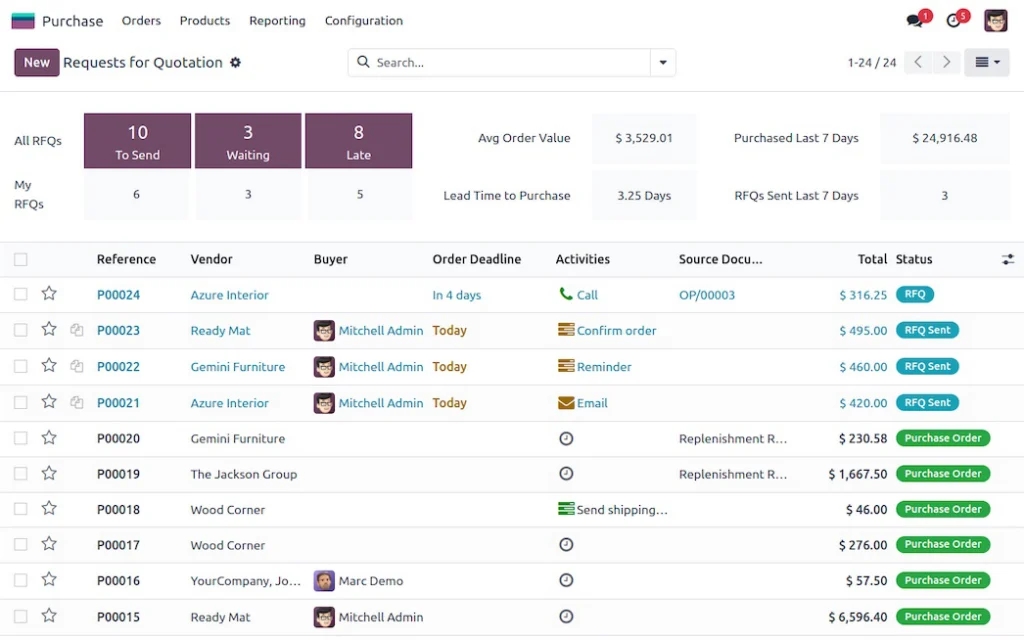
Purchasing often ties up more money than you’d like: too much material locks up capital, too little brings the workshop to a halt. Odoo Purchase knows your stock levels in real time and suggests orders as soon as an item falls below its minimum. Requests for quotation to vendors are created automatically and turn into a purchase order with one click.
With blanket orders and purchase agreements, you lock in negotiated prices and quantities so nobody accidentally reorders at list price. You match vendor bills against the purchase order and the receipt, and the statistics show who you buy how much from and how reliably they deliver. The result: ERP purchasing that thinks ahead.
- Automatic replenishment: order suggestions based on current stock levels
- Requests for quotation: get quotes from vendors automatically
- Blanket orders: record negotiated terms and order against them
- Payment terms: pay vendors according to your agreed conditions
- Purchase statistics: spending, vendors and on-time delivery at a glance
Who saves time and money with Odoo Purchase
Odoo Purchase fits wherever materials, goods or components are bought regularly: in retail and wholesale with many items, at the auto body shop with spare parts, or in the manufacturing business that needs raw materials for every order. If your orders currently run on email, phone and an Excel spreadsheet, there’s a lot to gain.
Many SMEs in Lucerne and Central Switzerland work with a handful of regular vendors. That’s exactly where blanket orders and automatic reordering help, because recurring orders almost take care of themselves.
Let’s Doo implements Odoo Purchase for you: we migrate vendors and products, define minimum stock levels and approval rules, train your team and set up reports so they answer the questions you actually ask.
How we bring Odoo Purchase into your business
Consulting
Before a single app gets installed, we look at how your business ticks. So by the end you know exactly whether – and how – Odoo fits you.
Ongoing Support
Odoo is never quite finished – and neither is your business. We stay with you for the long run, keep developing the system and think ahead with you.
Hosting
Fast, secure and compliant with both GDPR and revFADP: we host your Odoo in Switzerland, Germany or Finland – with backups, updates and maintenance. Your own hosting works too.
Support & Training
After go-live, everyday business begins. We’re there for your questions, train new team members and keep your Odoo in shape.
Customization
Odoo can do a lot – but not everything out of the box. We adapt fields, workflows and reports, and build custom modules when the standard isn’t enough.
Implementation
Starting fresh or switching over: from setup and data migration to training, we implement Odoo for you – carefully planned, step by step and never flying blind.
Odoo Purchase in combination
Purchase and Odoo Inventory are a well-rehearsed duo: stock levels trigger the order, and the receipt books the goods straight into stock. In Odoo Manufacturing, missing components automatically trigger a requirement. Vendor bills land in Odoo Accounting, where you can check them against the order and the delivery. And when customers order something through Odoo Sales that you don’t have in stock, Odoo can trigger the matching purchase order right away.
Still ordering from an Excel list?
In a free, no-obligation initial consultation, we’ll show you how Odoo makes your purchasing leaner.
Frequently asked questions about Odoo Purchase
Your question isn’t here? Ask us directly – the initial consultation is free and without obligation.
Can Odoo Purchase reorder automatically?
Yes. With minimum stock levels and replenishment rules, Odoo suggests orders or creates them automatically as soon as an item runs low.
Can we compare quotes from several vendors?
Yes. You can send requests for quotation to several vendors, record their replies and turn the best quote into a purchase order.
Which Odoo edition do we need for purchasing?
Purchase is part of Odoo’s core. We recommend Odoo Enterprise, because only then do you get features like the Barcode app at receiving, and you won’t have to switch later. We’ll work out which apps you really need in the initial consultation.