
Odoo Accounting
Accounting that almost reconciles itself
Odoo Accounting reads documents with AI, reconciles bank transactions automatically and delivers real-time financial reports, with the Swiss chart of accounts and VAT.
What Odoo Accounting takes off your plate
Less typing, more insight into the numbers
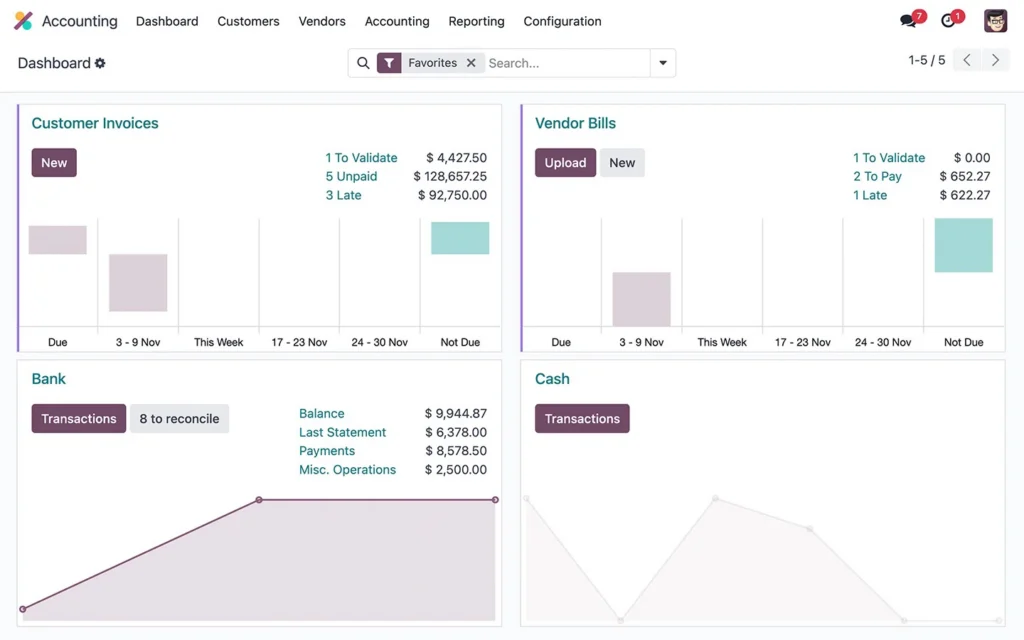
Most of the time in accounting isn’t spent on thinking but on typing and ticking things off. That’s exactly where Odoo Accounting steps in: vendor bills are read by AI, and bank transactions come into the system via bank synchronization or statement import and are automatically matched with open items.
For Switzerland, Odoo comes with its own localization: the Swiss SME chart of accounts, Swiss VAT rates, the QR-bill and payment files in the ISO 20022 format for your bank. Balance sheet, income statement and other financial reports are always up to date, not weeks after month-end. Your fiduciary will be delighted – or at least sigh less.
- AI document capture: read vendor bills instead of typing them
- Bank synchronization: pull account transactions into the ERP automatically
- Bank reconciliation: match payments to open items automatically
- Swiss localization: Swiss SME chart of accounts, VAT rates, QR-bill
- Real-time reports: balance sheet and income statement at the push of a button
- E-invoicing and dunning: automated reminders without chasing
When Odoo Accounting adds up for your business
Odoo Accounting suits SMEs that no longer want to run their finances in a siloed solution. Take the auto body shop that manages workshop orders in one program and its accounting in another, or the agency whose project figures only meet the financials at the end of the quarter.
Working with your accounting firm also gets easier when documents, bank and closings are all in one place. In Lucerne and across Central Switzerland, many businesses work closely with their fiduciary, and Odoo gives both sides the same view of the numbers.
Let’s Doo handles the implementation: setting up the chart of accounts and VAT, connecting bank accounts, carrying over opening balances and training your team. Where there are special requests, such as custom reports, we adapt Odoo.
How we bring Odoo Accounting into your business
Consulting
Before a single app gets installed, we look at how your business ticks. So by the end you know exactly whether – and how – Odoo fits you.
Ongoing Support
Odoo is never quite finished – and neither is your business. We stay with you for the long run, keep developing the system and think ahead with you.
Hosting
Fast, secure and compliant with both GDPR and revFADP: we host your Odoo in Switzerland, Germany or Finland – with backups, updates and maintenance. Your own hosting works too.
Support & Training
After go-live, everyday business begins. We’re there for your questions, train new team members and keep your Odoo in shape.
Customization
Odoo can do a lot – but not everything out of the box. We adapt fields, workflows and reports, and build custom modules when the standard isn’t enough.
Implementation
Starting fresh or switching over: from setup and data migration to training, we implement Odoo for you – carefully planned, step by step and never flying blind.
How Odoo Accounting works with everything else
Accounting is where almost every document in Odoo ends up. Invoices from Odoo Invoicing and Odoo Sales are posted automatically, as are vendor bills for orders from Odoo Purchase. Approved expenses from Odoo Expenses land in the right account, receipt included. No more double entry, and reports are accurate because all figures come from the same source. And at closing time, your fiduciary sees the same thing you do.
Typing in receipts is a thing of the past
Show us how your accounting works today, and we’ll show you what Odoo takes over. The initial consultation is free and no-obligation.
Frequently asked questions about Odoo Accounting
Your question isn’t here? Ask us directly – the initial consultation is free and without obligation.
Does Odoo Accounting support the Swiss QR-bill?
Yes. The Swiss localization generates QR-bills, including with a QR-IBAN, and comes with the Swiss SME chart of accounts and Swiss VAT rates. You export payments to your bank in the Swiss ISO 20022 format.
What’s the difference between Odoo Accounting and Odoo Invoicing?
With Odoo Invoicing you write invoices with a QR payment slip and record payments. Accounting builds on that and adds bank synchronization, bank reconciliation, dunning and financial reports. It’s part of Odoo Enterprise, which we recommend so you don’t have to switch later.
Can our fiduciary work directly in Odoo?
Yes, your fiduciary can get their own login and post, review and close directly in Odoo. That saves the back-and-forth with exported documents and lists.