
Odoo Expenses
Goodbye, shoebox full of receipts
With Odoo Expenses, employees snap their receipts on the go, you approve with one click, and accounting posts them without any follow-up questions.
What Odoo Expenses makes easier
From receipt to reimbursement without the paper chaos
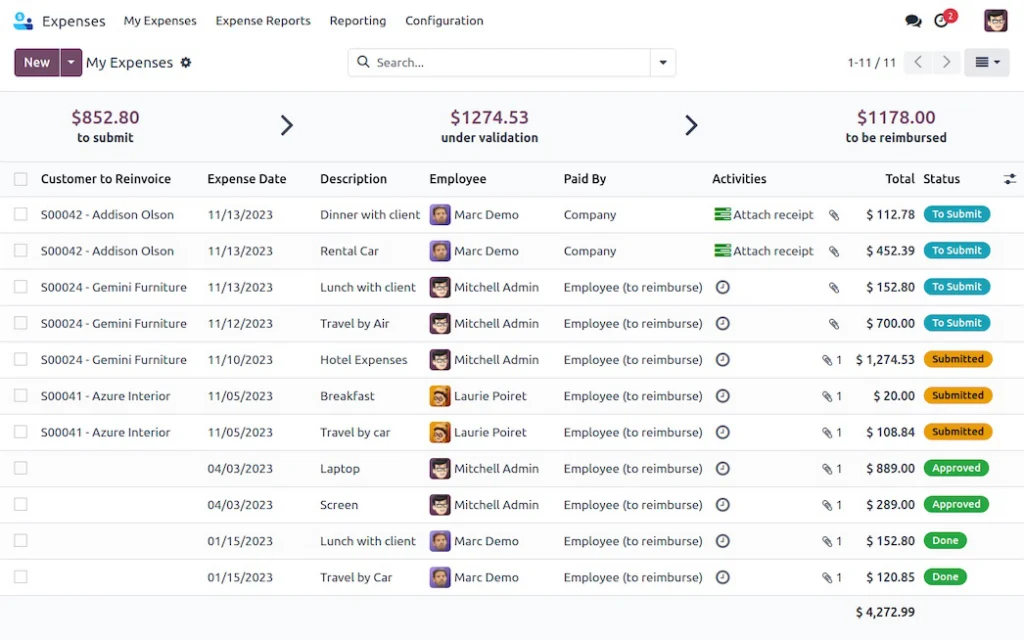
The same ritual at the end of every month: crumpled receipts, an Excel form and follow-up questions about the cost center. With Odoo Expenses, employees submit their receipts via the smartphone app, by email or by drag and drop. Odoo reads the receipts instead of someone typing in amounts. That saves everyone involved time, and nobody has to tape receipts onto A4 sheets anymore.
Individual expenses are bundled into a report and go to the manager for approval. Then you decide: reimburse employees or re-invoice customers, for example travel expenses for a project. Reports show where the money goes, no detective work required.
- Mobile app: snap and submit receipts on the go
- Receipt scan: have amounts and dates recognized automatically
- Multiple ways in: capture by email, scan or drag and drop
- Expense reports: individual expenses neatly bundled
- Reimburse or re-invoice: to employees or customers
- Approvals and reports for team leads and management
Who saves time with Odoo Expenses
Wherever employees spend money on the road: installers who quickly grab material from the hardware store for the job site, consultants with train tickets and client lunches, service technicians with parking fees. The more people work out in the field, the bigger the shoebox – and the more a digital solution pays off.
For service providers and trades businesses from Central Switzerland, who often travel beyond cantonal borders, re-invoicing to customers is a real win: expenses no longer slip through the cracks.
Let’s Doo sets up expense categories, approval workflows and posting, gets the app onto your team’s devices and shows in a short training session how submitting works. That way, expense reports go from end-of-month frustration to an afterthought.
How we bring Odoo Expenses into your business
Consulting
Before a single app gets installed, we look at how your business ticks. So by the end you know exactly whether – and how – Odoo fits you.
Ongoing Support
Odoo is never quite finished – and neither is your business. We stay with you for the long run, keep developing the system and think ahead with you.
Hosting
Fast, secure and compliant with both GDPR and revFADP: we host your Odoo in Switzerland, Germany or Finland – with backups, updates and maintenance. Your own hosting works too.
Support & Training
After go-live, everyday business begins. We’re there for your questions, train new team members and keep your Odoo in shape.
Customization
Odoo can do a lot – but not everything out of the box. We adapt fields, workflows and reports, and build custom modules when the standard isn’t enough.
Implementation
Starting fresh or switching over: from setup and data migration to training, we implement Odoo for you – carefully planned, step by step and never flying blind.
Expenses working with other Odoo apps
Approved expenses flow straight into Odoo Accounting, receipt attached, so your fiduciary no longer has to go hunting. You link expenses for a client project to the order in Odoo Sales and pass them on with the next invoice. Receipts can also be filed centrally in Odoo Documents, so retention is taken care of too. That way every receipt has exactly one path: from the phone through approval to the balance sheet.
Expenses without the paper chaos?
Tell us how your expenses work today, and we’ll show you the paperless way. The initial consultation is free and no-obligation.
Frequently asked questions about Odoo Expenses
Your question isn’t here? Ask us directly – the initial consultation is free and without obligation.
Can employees submit expenses by phone?
Yes. With the Odoo app or in the browser on their smartphone, they take a photo of the receipt and submit it right away. Odoo recognizes details such as amount and date.
How are expenses re-invoiced to customers?
You link the expense to the customer’s sales order. Once approved, it appears on the next invoice, at cost or at the price you set.
Who approves the expenses?
You decide – typically the manager or management. Odoo routes reports to the right person and shows at any time what’s still pending.