
Odoo Documents
Every file in the right place, no searching
Odoo Documents gathers emails, scans and files in one central place in the ERP, with folders and access rights. From there, vendor bills go straight to accounting.
What Odoo Documents puts in order
Filing, sharing and automation in one place
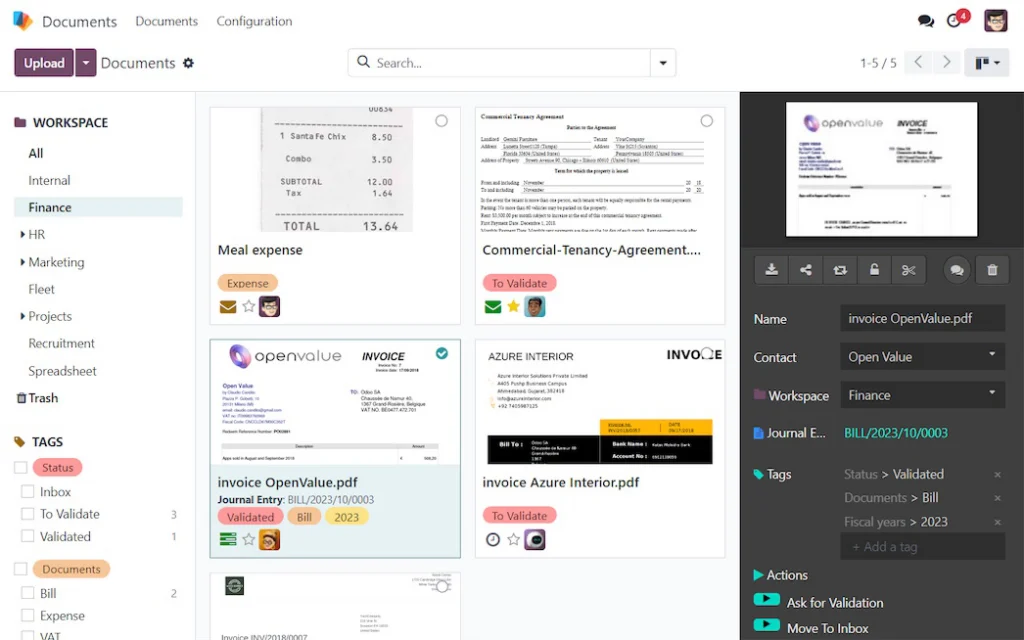
The network drive is called “Server_new_FINAL,” half the documents are stuck in personal inboxes, and the signed copy is sitting on someone’s desktop. Sound familiar? Odoo Documents brings everything into one central repository inside Odoo: emails, scans from the multifunction printer and uploaded files.
There you sort files into folders and workspaces with their own access rights. You process vendor bills right away, split large PDFs into individual documents, and automate recurring workflows. If a document from a customer or supplier is missing, you request it via link instead of writing three reminder emails.
- Central repository: emails, scans and files in one place
- Vendor bills: process them straight from the repository
- Request and share: request files or share them via link
- Signatures: send documents straight out for signature
- Split PDFs and automate workflows
- Access rights: folders and workspaces per team
Where Odoo Documents makes a difference
For businesses where paper and PDFs set the pace: the accounting firm that constantly receives documents from clients, the metalworking shop with plans, delivery notes and inspection reports, or the administration where every invoice first has to be scanned, named and filed.
Instead of being managed in a separate DMS, documents live right where the work happens: with the customer, the order, the invoice. That’s how many SMEs in Lucerne and Central Switzerland spare themselves the balancing act between file server and ERP.
Let’s Doo plans the folder structure with you, sets access rights, sets up the scan and email intake and automates whatever repeats. Then we show your team how the new filing system works day to day.
How we bring Odoo Documents into your business
Consulting
Before a single app gets installed, we look at how your business ticks. So by the end you know exactly whether – and how – Odoo fits you.
Ongoing Support
Odoo is never quite finished – and neither is your business. We stay with you for the long run, keep developing the system and think ahead with you.
Hosting
Fast, secure and compliant with both GDPR and revFADP: we host your Odoo in Switzerland, Germany or Finland – with backups, updates and maintenance. Your own hosting works too.
Support & Training
After go-live, everyday business begins. We’re there for your questions, train new team members and keep your Odoo in shape.
Customization
Odoo can do a lot – but not everything out of the box. We adapt fields, workflows and reports, and build custom modules when the standard isn’t enough.
Implementation
Starting fresh or switching over: from setup and data migration to training, we implement Odoo for you – carefully planned, step by step and never flying blind.
Odoo Documents and its neighbors
Documents is the hub for files from all over Odoo. Vendor bills move to Odoo Accounting with one click, and receipts from Odoo Expenses land in the right folder. You send contracts straight from the repository to Odoo Sign, and HR records from Odoo Employees stay protected in their own workspace. So you find every file where it belongs. No more attachments gathering dust somewhere in an inbox.
Fed up with “Server_new_FINAL”?
We’ll tidy up with you and bring your filing into the ERP. The first conversation about it is free and no-obligation.
Frequently asked questions about Odoo Documents
Your question isn’t here? Ask us directly – the initial consultation is free and without obligation.
Does Odoo Documents replace our file server?
For many business documents, yes – especially anything to do with customers, orders or invoices. Whether archives and technical data should move too is something we decide together with you.
Can I share documents with external parties?
Yes. You share files or entire folders via link and can request missing documents, which external parties then upload directly.
Who sees which files?
You set access rights per folder or workspace. That way accounting sees its documents, HR its personnel files, and nobody sees what’s none of their business.