
Odoo IoT
Measuring device, printer, camera? They all talk to Odoo
Odoo IoT connects measuring devices, cameras, printers and foot pedals to your database via the IoT Box – values land right where you need them.
What Odoo IoT makes possible in the workshop and warehouse
Plug in devices instead of typing in values
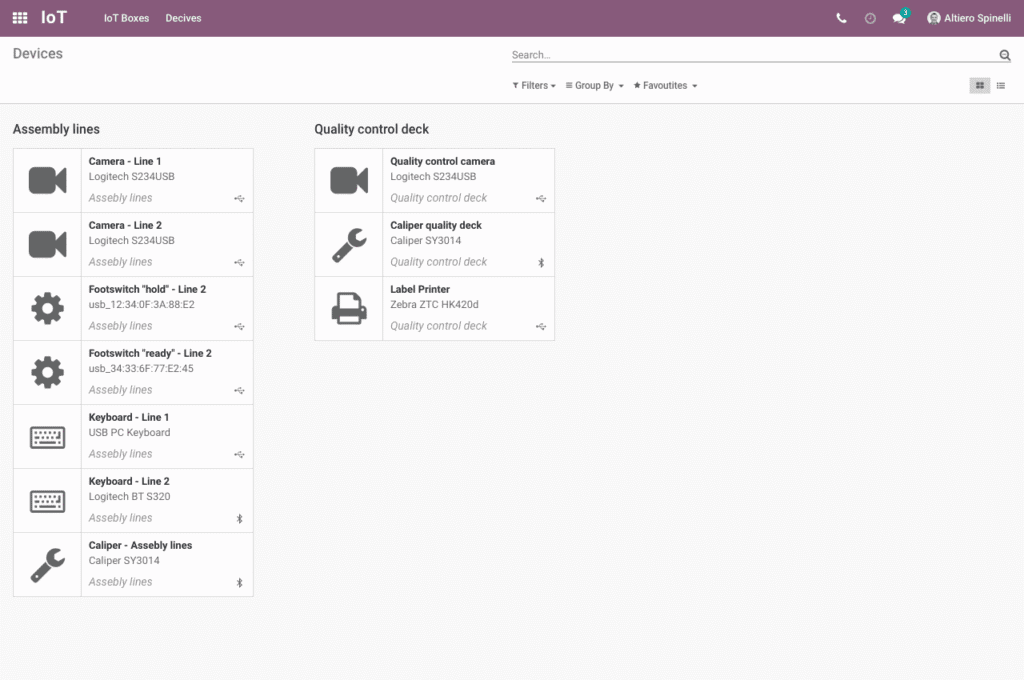
Someone reads the value off the measuring device, jots it down on a slip of paper and types it into the system later – and somewhere between those steps, the typo happens. Odoo IoT shortens the path: via the IoT Box you connect devices such as measuring instruments, cameras, label printers or foot pedals, and Odoo picks up the data directly.
Setup is deliberately kept simple: plug in the box, connect it to the database, assign the devices. Odoo IoT is especially strong in manufacturing and quality control, where measurements flow automatically into quality checks or the camera at the workstation takes a photo for the record. In the warehouse you automate processes by barcode, and the foot pedal confirms work steps without anyone having to take their hands off the workpiece.
- IoT Box: connect external devices to Odoo centrally
- Easy setup: plug in, connect, assign
- Many devices: measuring devices, cameras, printers and foot pedals
- Manufacturing and quality: take measurements straight into quality checks
- Warehouse: automate processes by barcode
Where Odoo IoT plays to its strengths
Odoo IoT is made for businesses where physical work and data come together: the machine shop that has to log tolerances, the food producer recording weights, or the metalworking business that wants to back up inspection reports with photos. In the shipping warehouse, too, where labels should print automatically, connecting device and ERP saves a lot of manual steps.
In Central Switzerland, with its many suppliers and manufacturers, this topic is often underestimated. Yet the rule is simple: every value nobody has to type in anymore is one less error.
Let’s Doo checks with you which devices make sense to connect, sets up the IoT Box and workstations, connects them with Manufacturing, Quality or Inventory and trains people right at the machine.
How we bring Odoo IoT into your business
Consulting
Before a single app gets installed, we look at how your business ticks. So by the end you know exactly whether – and how – Odoo fits you.
Ongoing Support
Odoo is never quite finished – and neither is your business. We stay with you for the long run, keep developing the system and think ahead with you.
Hosting
Fast, secure and compliant with both GDPR and revFADP: we host your Odoo in Switzerland, Germany or Finland – with backups, updates and maintenance. Your own hosting works too.
Support & Training
After go-live, everyday business begins. We’re there for your questions, train new team members and keep your Odoo in shape.
Customization
Odoo can do a lot – but not everything out of the box. We adapt fields, workflows and reports, and build custom modules when the standard isn’t enough.
Implementation
Starting fresh or switching over: from setup and data migration to training, we implement Odoo for you – carefully planned, step by step and never flying blind.
Odoo IoT working together with other apps
On its own, the IoT Box doesn’t do much; it shows its strength together with other apps. In Odoo Manufacturing employees confirm work steps with a foot pedal, in Odoo Quality measurements land straight in the quality checks, and in Odoo Inventory the label printer prints as soon as a delivery is ready. Odoo Point of Sale uses the box too, for example for a scale or cash drawer. One box, many devices, one system.
Let your devices have their say
Show us your workstations and devices – in a free, no-obligation initial consultation we'll work out what can be connected to Odoo.
FAQ about Odoo IoT
Your question isn’t here? Ask us directly – the initial consultation is free and without obligation.
What is an IoT Box?
A small device that acts as the go-between for your devices and Odoo. Measuring devices, printers or cameras are connected to the box, and the box talks to your Odoo database.
Which devices work with Odoo IoT?
Supported devices include measuring devices, cameras, printers, foot pedals and barcode scanners, among others. We’d best check with you before you buy whether a specific model fits.
Does Odoo IoT require the Enterprise edition?
Yes, Odoo IoT is part of Odoo Enterprise, the edition we recommend. In the initial consultation we’ll look at which devices make sense to connect in your business.