
Odoo Studio
Customize Odoo without a single line of code
With Odoo Studio you create fields, views, reports and automations yourself – with clicks instead of code. For anything bigger, there's us.
What you build yourself with Odoo Studio
Fields, views and workflows by drag and drop
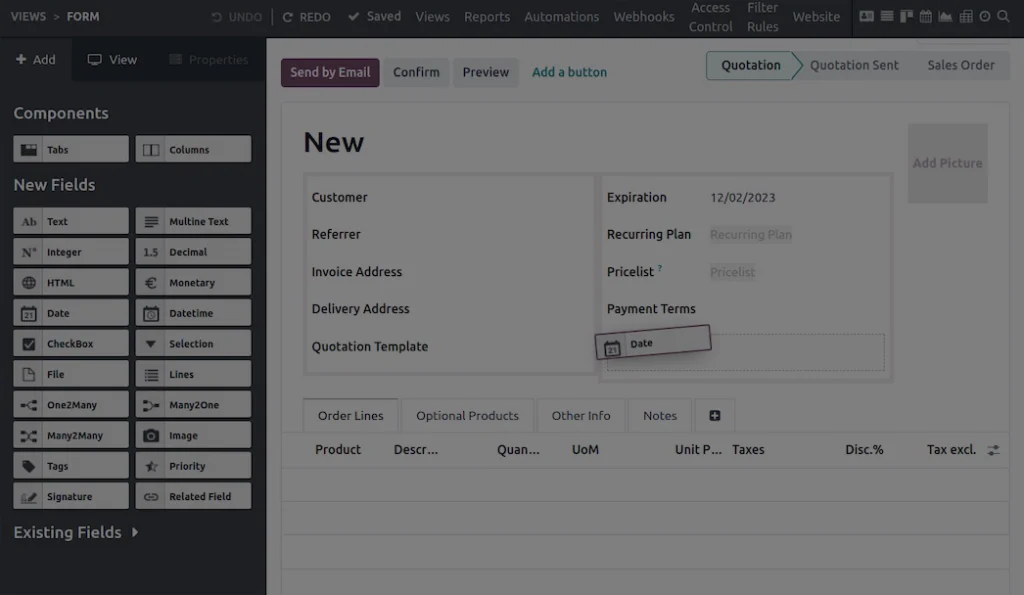
Your business needs a field for the building owner on the order, a “framework agreement” checkbox in the customer master data and a different layout on the quote? With Odoo Studio you do it yourself: open Studio, drag in the field, save. You adapt views the same way, whether list, form, Kanban or calendar.
Studio can do more than fields: you design reports and documents, set up automations and approval workflows and even build small apps of your own, for example for managing equipment internally. With the menu editor you rearrange the navigation, and if you want to dig deeper, there’s an XML editor. Studio is part of Odoo Enterprise and works directly in your database, with no development environment at all.
- No code: adapt existing apps with a few clicks
- Fields and views: new fields, lists and forms
- Your own apps: small solutions for internal processes
- Reports and documents: design layouts yourself
- Automations: including approval workflows
- Menu and XML editor: for fine-tuning and advanced users
Studio or a real module – what's right for you?
Odoo Studio is ideal for anyone who wants to tailor Odoo to their business in small ways: an extra field for the carpentry shop, a customized delivery slip for the retailer, an approval step for purchases at the agency. You implement adjustments like these yourself with Studio, without waiting for someone from development.
To be honest, though, Studio has its limits. Complex logic, interfaces to other systems or customizations that reach across many apps belong in a properly developed module that can be versioned and tested – which is also more robust during updates. We’d rather explain this difference to SMEs in Lucerne and Central Switzerland up front rather than after the fact.
Let’s Doo helps in both directions: we train you in Studio so you can make small adjustments yourselves, and we develop custom Odoo modules when the requirements go beyond that.
How we bring Odoo Studio into your business
Consulting
Before a single app gets installed, we look at how your business ticks. So by the end you know exactly whether – and how – Odoo fits you.
Ongoing Support
Odoo is never quite finished – and neither is your business. We stay with you for the long run, keep developing the system and think ahead with you.
Hosting
Fast, secure and compliant with both GDPR and revFADP: we host your Odoo in Switzerland, Germany or Finland – with backups, updates and maintenance. Your own hosting works too.
Support & Training
After go-live, everyday business begins. We’re there for your questions, train new team members and keep your Odoo in shape.
Customization
Odoo can do a lot – but not everything out of the box. We adapt fields, workflows and reports, and build custom modules when the standard isn’t enough.
Implementation
Starting fresh or switching over: from setup and data migration to training, we implement Odoo for you – carefully planned, step by step and never flying blind.
Odoo Studio working together with other apps
Studio affects all the other apps. In Odoo CRM you add the fields your sales team really needs, in Odoo Sales you adapt the layout of the quote, and in Odoo Project you build your own views. For approvals across the business, Odoo Approvals complements the workflows from Studio. Important: whatever you build in Studio should be documented, so it stays traceable at the next update too.
DIY or have it built?
Tell us what you're missing in Odoo – in a free, no-obligation initial consultation we'll tell you honestly whether Studio is enough or a module is the better fit.
FAQ about Odoo Studio
Your question isn’t here? Ask us directly – the initial consultation is free and without obligation.
When is Odoo Studio enough, and when do we need development?
For extra fields, customized views, reports and simple automations, Studio is usually enough. As soon as it comes to complex logic, interfaces or tightly interlinked processes, a custom module is the more robust solution.
Are Studio customizations kept during an Odoo update?
Studio customizations are generally carried over during an upgrade. But the more you customize, the more important it is to check the changes before the update – and we support you with that.
Do we need Odoo Enterprise for Odoo Studio?
Yes, Studio is only available with Odoo Enterprise, the edition we recommend. Whatever Studio doesn’t cover, we solve with custom modules.