
Odoo VoIP
Phone calls with context instead of guesswork
Odoo VoIP brings the phone into your ERP: you call with one click, see instantly who's on the line, and every call lands with the right customer.
What Odoo VoIP changes on the phone
Calls, customer data and notes in one place
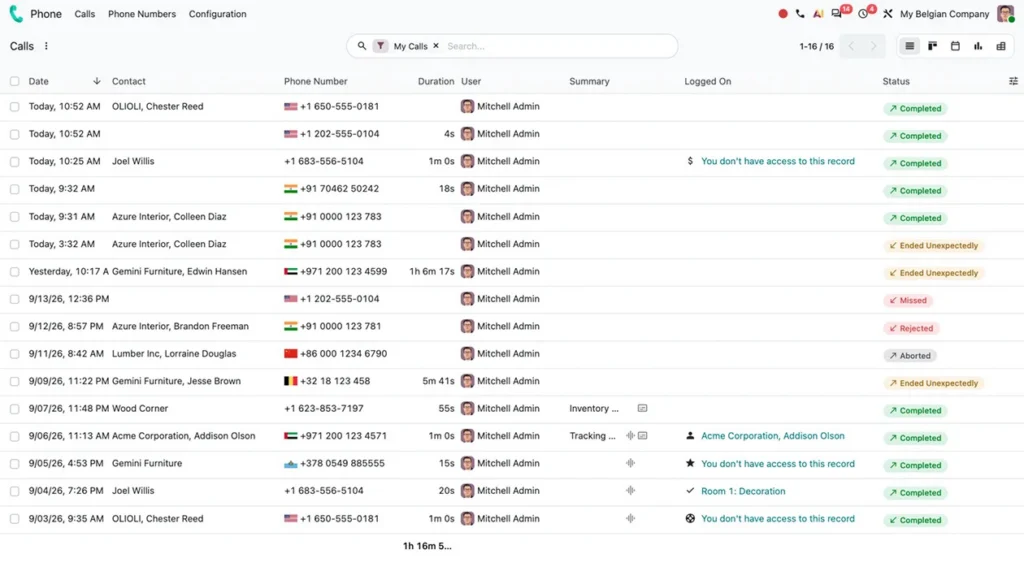
The phone rings, an unknown number, and while you’re saying “Grüezi”, you’re frantically searching for the customer file. With Odoo VoIP that’s over: with every call you see right away who’s calling, which quotes are open and what was discussed last time. To call out, you just click the number, right from Odoo.
With the call flow designer you decide who takes which calls, so customers reach the right person. Every call is logged on the customer record, with AI notes that capture the key points if you like. You can get phone numbers directly through Odoo, and reports show sales and the call center when things get busy. You don’t need a traditional phone system for this, just a VoIP provider.
- Click to call: make calls right from Odoo
- Caller context: customer data appears while it rings
- Call flows: route calls to the right person
- AI notes: capture the conversation without taking notes
- Phone numbers: get them directly through Odoo
- Reports: analytics for sales and the call center
Who Odoo VoIP is made for
For teams where the phone is still the most important sales and service tool: the wholesaler with regular customers who’d rather call than email, the body shop where insurers and customers ask how the repair is coming along, or the inside sales team following up on quotes every day.
Especially at SMEs in Lucerne and Central Switzerland, where a lot still gets settled over the phone, having context while it rings makes a real difference. No more “Just a moment, let me check”, no callback just because the documents were in the wrong window.
Let’s Doo works out the provider and numbers with you, sets up Odoo VoIP and the call flows and trains your team, so calling from Odoo works smoothly from day one. If you have special processes, for example for on-call duty, we adapt them.
How we bring Odoo VoIP into your business
Consulting
Before a single app gets installed, we look at how your business ticks. So by the end you know exactly whether – and how – Odoo fits you.
Ongoing Support
Odoo is never quite finished – and neither is your business. We stay with you for the long run, keep developing the system and think ahead with you.
Hosting
Fast, secure and compliant with both GDPR and revFADP: we host your Odoo in Switzerland, Germany or Finland – with backups, updates and maintenance. Your own hosting works too.
Support & Training
After go-live, everyday business begins. We’re there for your questions, train new team members and keep your Odoo in shape.
Customization
Odoo can do a lot – but not everything out of the box. We adapt fields, workflows and reports, and build custom modules when the standard isn’t enough.
Implementation
Starting fresh or switching over: from setup and data migration to training, we implement Odoo for you – carefully planned, step by step and never flying blind.
Odoo VoIP working together with other apps
In Odoo CRM you call leads straight from the pipeline and schedule the next call as an activity. In Odoo Helpdesk the support team has the right ticket in front of them while the phone rings, and in Odoo Sales inside sales follows up on quotes without typing in a number. Everything discussed on the phone stays attached to the record and can be found by the whole team.
Pick up – with all the info at hand
In a free, no-obligation initial consultation, we show you what calling with Odoo VoIP could look like for you.
FAQ about Odoo VoIP
Your question isn’t here? Ask us directly – the initial consultation is free and without obligation.
Do we still need a phone system in addition to Odoo VoIP?
Usually not. Odoo VoIP runs through a VoIP provider directly in the browser or in the Odoo app, so no traditional phone system is needed. We’ll work out with you whether you can replace your current system entirely.
Can we keep our existing phone number?
That depends on your current provider. We’ll check with you whether you can port the number or connect your existing VoIP provider.
Which edition is Odoo VoIP available in?
Odoo VoIP is part of Odoo Enterprise, the edition we recommend. In the initial consultation we’ll look at which apps you really need.