
Odoo Point of Sale for Restaurants
From table to kitchen, no paper slips
Odoo Point of Sale for restaurants takes orders at the table, sends them straight to the kitchen and splits the bill at the end exactly the way the table wants.
What the Odoo restaurant POS does during service
Floor plan, kitchen, tips and reservations
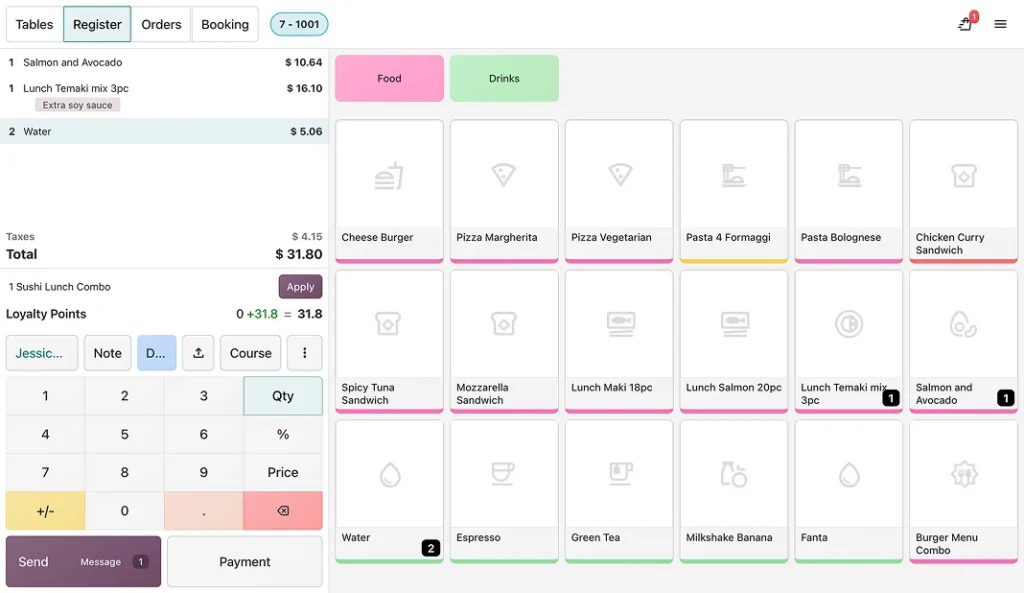
Friday night, the terrace is packed, and table seven wants to pay separately. That’s exactly the kind of moment the restaurant version of Odoo Point of Sale is made for. Your service team opens the table in the visual floor plan, enters the order on the tablet, and the items show up instantly in the kitchen or at the bar. No illegible slips, no running back and forth.
When it’s time to pay, you split the bill and record the tip properly. Guests can also place their own orders via smartphone or kiosk, and table reservations run in the same system. Because the register keeps running offline, service stays steady even when the Wi-Fi gets a little shaky.
- Floor plan: enter orders right at the correct table
- Off to the kitchen: orders go straight to kitchen and bar
- Split the bill: separate payments, tips recorded
- Self-ordering: guests order via smartphone or kiosk
- Reservations: table reservations in the same system
- Fail-safe: reliable online and offline
Who the restaurant POS is made for
For hospitality businesses where service has to be fast. The neighborhood restaurant with a lunch menu and a big rush at noon. The bar where drinks go straight from the order to the counter. The café with takeout, where guests place their own orders via QR code. A hotel with a restaurant and terrace can also map several rooms in the floor plan.
In Central Switzerland, where day-trip weather and the high season push service to its limits on some days, every minute between order and plate counts.
Let’s Doo sets up floor plan, menu, printers and kitchen connection and trains your service team right at the device, so everyone feels confident from the very first evening. On request, we connect the register with purchasing and accounting, so things add up behind the scenes too.
How we bring Odoo Point of Sale for Restaurants into your business
Consulting
Before a single app gets installed, we look at how your business ticks. So by the end you know exactly whether – and how – Odoo fits you.
Ongoing Support
Odoo is never quite finished – and neither is your business. We stay with you for the long run, keep developing the system and think ahead with you.
Hosting
Fast, secure and compliant with both GDPR and revFADP: we host your Odoo in Switzerland, Germany or Finland – with backups, updates and maintenance. Your own hosting works too.
Support & Training
After go-live, everyday business begins. We’re there for your questions, train new team members and keep your Odoo in shape.
Customization
Odoo can do a lot – but not everything out of the box. We adapt fields, workflows and reports, and build custom modules when the standard isn’t enough.
Implementation
Starting fresh or switching over: from setup and data migration to training, we implement Odoo for you – carefully planned, step by step and never flying blind.
More than just a restaurant register
The restaurant POS is the same Odoo Point of Sale used in retail, extended with floor plan and kitchen. Odoo Inventory automatically deducts sold items, and with Odoo Purchase you reorder from your suppliers. You create shift schedules for your service team in Odoo Planning, and the daily closings go straight to accounting. So on Monday the boss has more time for guests and less for numbers.
Fewer slips, more service?
Tell us how service runs today, and we’ll show you the Odoo restaurant POS. The initial consultation is free and no-obligation.
Frequently asked questions about Odoo Point of Sale for Restaurants
Your question isn’t here? Ask us directly – the initial consultation is free and without obligation.
Can I split the bill at a table?
Yes, the bill can be split by item so each guest pays their share. Tips are recorded separately.
Can guests place their own orders?
Yes, via smartphone using a QR code on the table, or at a kiosk. These orders go straight to the kitchen like all the others.
What’s the difference from the regular Odoo Point of Sale?
It’s the same app, but with the features for hospitality: floor plan, kitchen orders, bill splitting and tips. For a shop without table service, you don’t need them.