
Odoo Spreadsheet
The feel of Excel, but with live data from Odoo
Odoo Spreadsheet pulls sales, inventory and financial figures live from the ERP into familiar spreadsheets and dashboards. No exports, no copy-paste, no outdated numbers.
What you can analyze with Odoo Spreadsheet
Formulas, pivot tables and dashboards right on your data
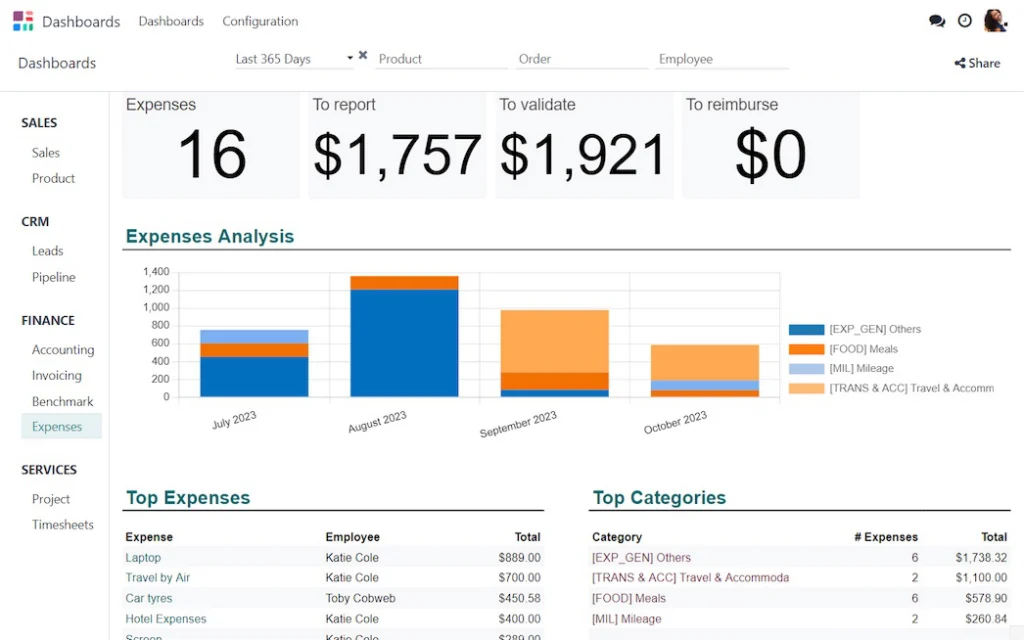
Almost every SME has one: that Excel file someone feeds by hand with exports every Monday. Odoo Spreadsheet makes that step unnecessary. The spreadsheets live right inside the ERP and pull their data from Odoo in real time, whether revenue, stock levels or open items. The numbers are correct the moment you open the spreadsheet.
If you know Excel, you’ll find your way around immediately: formulas, conditional formatting, pivot tables and charts work as usual. From these you build interactive dashboards with smart filters, for example by region, product group or time period. And because the team works together on the same spreadsheet, there’s no more “_v3_corrected” version.
- Live data: spreadsheets update straight from Odoo
- Pivots and charts: analysis without exporting
- Dashboards: interactive, with filters for every question
- Formulas and conditional formatting as usual
- Teamwork: work together on one spreadsheet instead of on copies
Who decides faster with Odoo Spreadsheet
For management teams who want to see the numbers without asking someone for an export. For the trading company that wants to compare margins per supplier, the production team that has to keep an eye on capacity and scrap, or the agency that wants to know which clients are really profitable.
In SMEs, controlling often happens on the side, and that’s exactly where live reports save a lot of manual work. A few good dashboards replace many a reporting meeting, including at businesses in Central Switzerland that have been juggling Excel lists until now.
Let’s Doo builds the reports you really need together with you: defining KPIs, setting up spreadsheets and dashboards, setting permissions. In a training session, your team learns to create its own pivot tables.
How we bring Odoo Spreadsheet into your business
Consulting
Before a single app gets installed, we look at how your business ticks. So by the end you know exactly whether – and how – Odoo fits you.
Ongoing Support
Odoo is never quite finished – and neither is your business. We stay with you for the long run, keep developing the system and think ahead with you.
Hosting
Fast, secure and compliant with both GDPR and revFADP: we host your Odoo in Switzerland, Germany or Finland – with backups, updates and maintenance. Your own hosting works too.
Support & Training
After go-live, everyday business begins. We’re there for your questions, train new team members and keep your Odoo in shape.
Customization
Odoo can do a lot – but not everything out of the box. We adapt fields, workflows and reports, and build custom modules when the standard isn’t enough.
Implementation
Starting fresh or switching over: from setup and data migration to training, we implement Odoo for you – carefully planned, step by step and never flying blind.
Odoo Spreadsheet and your data sources
Spreadsheets are only as good as the data underneath, and that comes from all the Odoo apps. Odoo Sales supplies revenue and margins, Odoo Inventory stock levels and movements, Odoo Accounting the financials. Finished spreadsheets live in Odoo Documents, where they’re shared with the team, neatly according to access rights. So every department works with the same numbers. No more debates about the “right” number.
Monday export? Not anymore.
Tell us which numbers you pull together every week, and we’ll show you the right dashboard. The initial consultation is free and no-obligation.
Frequently asked questions about Odoo Spreadsheet
Your question isn’t here? Ask us directly – the initial consultation is free and without obligation.
Can I keep using existing Excel files?
Yes, Excel files can be opened in Odoo and edited further as spreadsheets. Things get really interesting once you replace the values with live data from Odoo.
Do I need programming skills for dashboards?
No. You insert pivot tables and charts straight from the Odoo views, and formulas work just like in Excel. For more complex KPIs, we help you build them.
Are the numbers always up to date?
Yes, the data is loaded directly from Odoo when you open the spreadsheet. So you never work with last week’s export.